Agregar margen a PDF en n8n
Agregar margen a PDF es un PDF4me acción del nodo en n8n que agrega márgenes izquierdo, derecho, superior e inferior a un PDFCada uno se mide en milímetros. Úselo para crear espacio de encuadernación para informes impresos, dejar espacio para anotaciones en folletos o adaptar automáticamente los documentos entrantes al formato estándar de la empresa.
Lo que hace este nodo
PDF4me: Agregar margen a PDF toma una PDF a partir de datos binarios, un Base64 String, o un URL y devuelve un nuevo archivo con los cuatro márgenes especificados, aplicados en milímetros. Cada lado se configura de forma independiente, por lo que un margen de encuadernación asimétrico simplemente implica un margen izquierdo mayor. Dado que se ejecuta como un paso del flujo de trabajo, se puede aplicar el mismo estándar de margen a todos los documentos que llegan sin necesidad de que nadie abra un editor de escritorio.
Autenticando su API Pedido
Cada PDF4me nodo en n8n requiere un válido Credencial para conectarse con. Crea o selecciona uno que contenga tu PDF4me API clave para que el flujo de trabajo pueda autenticar las solicitudes de margen de forma segura.
Datos importantes que no debes perderte
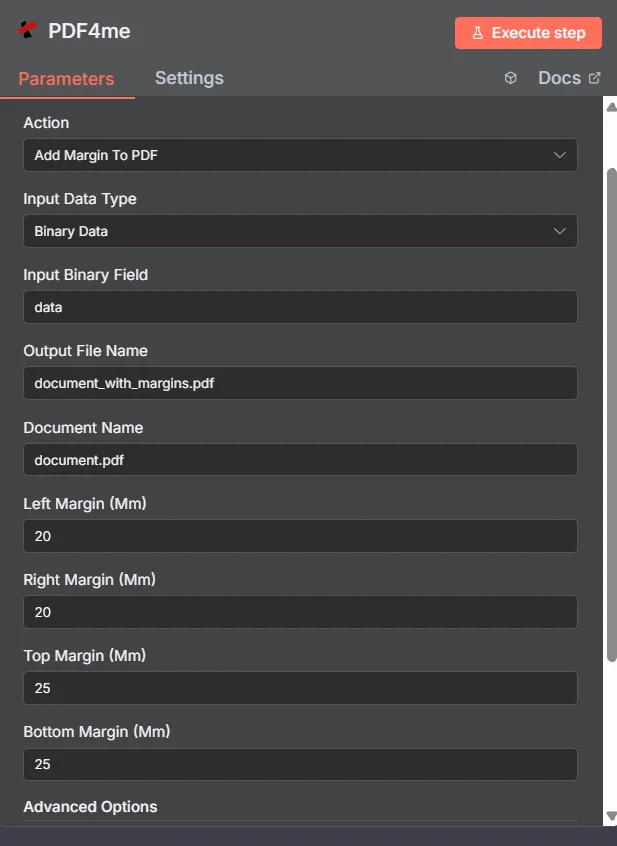
PDF4me Agregar margen a PDF panel de parámetros en n8n
Márgenes automatizados (n8n) frente a un escritorio PDF Editor
La mayoría de los resultados de esta búsqueda son editores que permiten trabajar con un archivo a la vez. La diferencia radica en dónde se realiza el trabajo.
| Acercarse | Desencadenar | Mejor ajuste |
|---|---|---|
| Desktop editor or online margin tool | A person opens and adjusts one file by hand | A single document you are already working on |
| PDF4me Add Margin To PDF in n8n | A generated report, an upload, or a scheduled batch | Applying one house margin standard to every document that arrives, unattended |
¿Qué parámetros añaden margen? PDF ¿Necesidad?
Requerido: Acción, tipo de datos de entrada, el campo que coincide con ese tipo de entrada, nombre del archivo de salida, nombre del documento y los cuatro valores de margen. El nombre de salida de datos binarios y los perfiles personalizados conservan valores predeterminados.
| Parámetro | Requerido | Lo que hace | Ejemplo |
|---|---|---|---|
| Action | Required | Selects the PDF4me node action to run. Choose Add Margin To PDF. | Add Margin To PDF |
| Input Data Type | Required | Format of the source PDF input. Choose Binary Data (from a previous node), Base64 String, or URL. | Binary Data |
| Input Binary Field | Conditional | Name of the binary property on the incoming n8n item that holds the PDF. Required when Input Data Type is Binary Data. Defaults to data. | data |
| Base64 Document Content | Conditional | Base64-encoded content of the source PDF. Required when Input Data Type is Base64 String. | JVBERi0xLjQK... |
| File URL | Conditional | Publicly reachable HTTPS URL to the source PDF. Required when Input Data Type is URL. | https://example.com/report.pdf |
| Output File Name | Required | Filename for the PDF returned with margins applied. Include the .pdf extension. | document_with_margins.pdf |
| Document Name | Required | Filename of the source PDF, used for reference and tracking on the request. | document.pdf |
| Left Margin (Mm) | Required | Left margin width in millimetres. Set this larger than the other sides when you need binding space. | 20 |
| Right Margin (Mm) | Required | Right margin width in millimetres. | 20 |
| Top Margin (Mm) | Required | Top margin height in millimetres. Increase it when a printed header or letterhead needs clearance. | 25 |
| Bottom Margin (Mm) | Required | Bottom margin height in millimetres. Increase it when a footer or page number needs clearance. | 25 |
| Binary Data Output Name | Optional | Name of the binary property the output item exposes. Defaults to data. | data |
| Custom Profiles | Optional | Advanced Options field for extra processing settings, supplied in a JSON-like format. Leave blank unless you have a specific profile to apply. | { "preserveContentQuality": true } |
Campos de salida
Una carrera exitosa devuelve uno n8n artículo que lleva el PDF con márgenes aplicados.
| Campo | Tipo | Lo que contiene |
|---|---|---|
Binary (data) | Binary | The PDF with the four margin values applied, under Binary Data Output Name (default data). |
fileName | String | Generated filename, matching Output File Name. |
mimeType | String | MIME type of the output, always application/pdf. |
fileSize | Number | Size of the returned PDF in bytes. |
pageCount | Number | Number of pages processed with margin adjustments. |
success | Boolean | True when the margin operation completed, false on failure. Use it to branch error handling. |
message | String | Human-readable status message, carrying success confirmation or error detail. |
¿Cómo configuro Agregar margen a? PDF en n8n¿
- Agregar PDF4me a tu n8n flujo de trabajo y elegir el Agregar margen a PDF acción.
- En Credencial para conectarse con, seleccione su PDF4me credenciales o haga clic Crear nueva credencial y pega tu API llave.
- Colocar Tipo de datos de entrada a Datos binarios (por defecto), Base64 String, o URL y proporcionar la fuente correspondiente PDF campo.
- Ingresar Margen izquierdo (mm), Margen derecho (mm), Margen superior (mm), y Margen inferior (mm) en milímetros.
- Colocar Nombre del archivo de salida (debe terminar en
.pdf) y Nombre del documento para el archivo fuente. - Ejecuta el nodo y enruta el resultado. PDF al siguiente paso, como el almacenamiento, el correo electrónico o una cola de impresión.
Configuraciones típicas
Ejemplos de flujo de trabajoCommon n8n workflow patterns using Add Margin to PDF.
- Se genera un informe programado como un PDF de la noche a la mañana.
- Agregar margen a PDF Aplica un margen izquierdo amplio y valores más estrechos en los lados derecho, superior e inferior.
- El resultado se envía a la cola de impresión con espacio para encuadernación en espiral o con peine.
- El material de capacitación se sube a una carpeta compartida.
- Agregar margen a PDF Amplía el margen derecho para que los lectores tengan espacio para tomar notas.
- La copia con las anotaciones ya preparadas se distribuye a los asistentes.
- Un webhook recibe PDFs de un proveedor externo con diseños inconsistentes.
- Agregar margen a PDF Aplica los mismos cuatro valores a todos los archivos.
- Los documentos ingresan al archivo con una presentación de página uniforme.
- Un documento fusionado se elabora a partir de varias fuentes.
- Agregar margen a PDF crea primero el espacio libre inferior.
- Agregar página Number a PDF Luego coloca la numeración dentro del nuevo espacio del pie de página.
Consejos prácticos
Hoja de trucos
| Campo | Valor |
|---|---|
| Action | Add Margin To PDF |
| Input Data Type | Binary Data |
| Input Binary Field | data |
| Output File Name | document_with_margins.pdf |
| Document Name | document.pdf |
| Left / Right Margin (Mm) | 20 / 20 |
| Top / Bottom Margin (Mm) | 25 / 25 |
| Binary Data Output Name | data |
| Credentials | PDF4me API credential |