Agregar archivo adjunto a PDF en n8n
Agregar archivo adjunto a PDF es un PDF4me acción del nodo en n8n que incrusta uno o más archivos dentro de un PDF, por lo que una hoja de cálculo, una imagen, un archivo o un segundo PDF Se transporta junto con el documento, no al lado. Úselo para adjuntar pruebas a un contrato, enviar datos sin procesar junto a un informe o incluir certificados en un documento de cumplimiento.
Lo que hace este nodo
PDF4me: Agregar archivo adjunto a PDF toma un anfitrión PDF a partir de datos binarios, un Base64 String, o un URL, luego incrusta cada archivo que usted enumera en Archivos adjuntos dentro de él como un objeto separado. A diferencia de la fusión, los archivos adjuntos mantienen su propio formato y nombre de archivo y pueden ser abiertos o guardados individualmente por el destinatario. Cada archivo adjunto puede provenir de una fuente diferente, por lo que un archivo binario de un nodo anterior y un archivo obtenido de un URL se pueden integrar en la misma ejecución.
Autenticando su API Pedido
Cada PDF4me nodo en n8n requiere un válido Credencial para conectarse con. Crea o selecciona uno que contenga tu PDF4me API clave para que el flujo de trabajo pueda autenticar las solicitudes de archivos adjuntos de forma segura.
Datos importantes que no debes perderte
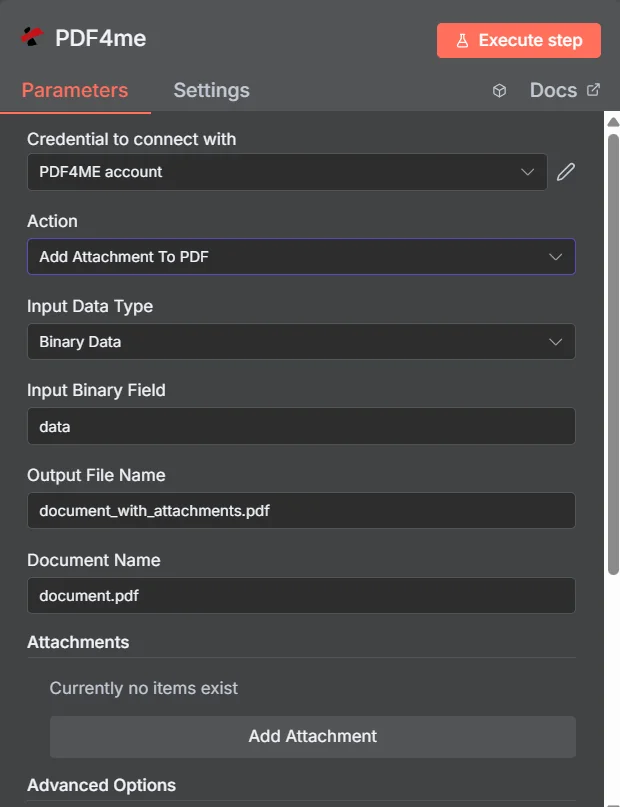
PDF4me Agregar archivo adjunto a PDF panel de parámetros en n8n, con la colección Attachments vacía antes de que se agregue la primera entrada.
Adjuntar vs. Fusionar vs. Comprimir
Tres maneras de entregar varios archivos como si fueran uno solo, con diferentes consecuencias para el destinatario.
| Acercarse | Lo que recibe el destinatario | Mejor ajuste |
|---|---|---|
| Add Attachment to PDF | One PDF that opens normally, with the extra files available in the attachments panel | Supporting material that must stay in its original format, such as a spreadsheet or an archive |
| Merge PDFs | One continuous document where all pages read in sequence | Content that genuinely belongs together as a single readable document |
| Zip the files together | An archive that must be unpacked before anything can be read | Bulk transfer where nothing needs to be readable without extracting first |
¿Qué parámetros agrega adjuntos? PDF ¿Necesidad?
Requerido: Acción, tipo de datos de entrada, el campo que coincide con ese tipo de entrada, nombre del archivo de salida, nombre del documento y al menos una entrada en Archivos adjuntos. El nombre de salida de datos binarios y los perfiles personalizados tienen valores predeterminados que funcionan.
| Parámetro | Requerido | Lo que hace | Ejemplo |
|---|---|---|---|
| Action | Required | Selects the PDF4me node action to run. Choose Add Attachment To PDF. | Add Attachment To PDF |
| Input Data Type | Required | Format of the host PDF input. Choose Binary Data (from a previous node), Base64 String, or URL. | Binary Data |
| Input Binary Field | Conditional | Name of the binary property on the incoming n8n item that holds the host PDF. Required when Input Data Type is Binary Data. Defaults to data. | data |
| Base64 Document Content | Conditional | Base64-encoded content of the host PDF. Required when Input Data Type is Base64 String. | JVBERi0xLjQK... |
| File URL | Conditional | Publicly reachable HTTPS URL to the host PDF. Required when Input Data Type is URL. | https://example.com/contract.pdf |
| Output File Name | Required | Filename for the PDF returned with the files embedded. Include the .pdf extension. | document_with_attachments.pdf |
| Document Name | Required | Filename of the source PDF, used for reference and tracking on the request. | document.pdf |
| Attachments | Required | Collection of files to embed. Click Add Attachment once per file, then fill in the per-attachment fields listed below. | One entry per embedded file |
| Binary Data Output Name | Optional | Name of the binary property the output item exposes. Defaults to data. | data |
| Custom Profiles | Optional | Advanced Options field for extra processing settings, supplied in a JSON-like format. Leave blank unless you have a specific profile to apply. | { "preserveMetadata": true } |
Campos dentro de cada entrada de archivo adjunto
Cada entrada que crees con Agregar archivo adjunto expone su propio conjunto de campos.
| Parámetro | Requerido | Lo que hace | Ejemplo |
|---|---|---|---|
| Attachment Content Type | Required | How this particular attachment is supplied. Choose Binary Data, Base64 Content, or File URL. Each entry can differ. | Binary Data |
| Attachment Name | Required | Filename the embedded file will carry inside the PDF. Include the correct extension so readers can open it after extraction. | supporting_data.xlsx |
| Binary Field Name | Conditional | Name of the binary property holding this attachment. Required when Attachment Content Type is Binary Data. | data |
| Base64 Content | Conditional | Base64-encoded content of this attachment. Required when Attachment Content Type is Base64 Content. | SGVsbG8gV29ybGQ= |
| File URL | Conditional | Publicly reachable HTTPS URL to this attachment. Required when Attachment Content Type is File URL. | https://example.com/certificate.pdf |
Campos de salida
Una carrera exitosa devuelve uno n8n artículo que lleva el PDF con sus archivos incrustados.
| Campo | Tipo | Lo que contiene |
|---|---|---|
Binary (data) | Binary | The PDF with all listed files embedded, under Binary Data Output Name (default data). |
fileName | String | Generated filename, matching Output File Name. |
mimeType | String | MIME type of the output, always application/pdf. |
fileSize | Number | Size of the returned PDF in bytes, including the embedded files. |
attachmentCount | Number | Number of attachments successfully embedded. Compare it against your expected count to catch a silently skipped file. |
success | Boolean | True when the attachment operation completed, false on failure. Use it to branch error handling. |
message | String | Human-readable status message, carrying success confirmation or error detail. |
¿Cómo configuro Agregar archivo adjunto? PDF en n8n¿
- Agregar PDF4me a tu n8n flujo de trabajo y elegir el Agregar archivo adjunto a PDF acción.
- En Credencial para conectarse con, seleccione su PDF4me credenciales o haga clic Crear nueva credencial y pega tu API llave.
- Colocar Tipo de datos de entrada a Datos binarios (por defecto), Base64 String, o URL y proporcionar el anfitrión correspondiente PDF campo.
- Bajo Archivos adjuntos, haga clic Agregar archivo adjunto una vez por cada archivo, luego establezca su Tipo de contenido adjunto, Nombre del archivo adjuntoy campo de origen coincidente.
- Colocar Nombre del archivo de salida (debe terminar en
.pdf) y Nombre del documento para el archivo fuente. - Ejecuta el nodo y enruta el resultado. PDF adelante, comprobando
attachmentCounten comparación con la cantidad de archivos que esperabas.
Configuraciones típicas
Ejemplos de flujo de trabajoCommon n8n workflow patterns using Add Attachment to PDF.
- Una factura PDF Se genera a partir de los datos de facturación.
- Agregar archivo adjunto a PDF Incluye los recibos correspondientes y el registro de aprobación.
- Un archivo se envía al departamento de cuentas por pagar con todo el rastro de evidencia en su interior.
- Se genera un informe analítico programado para PDF.
- Agregar archivo adjunto a PDF incrusta el subyacente CSV exportar como archivo adjunto con nombre.
- Los lectores comprenden la información y pueden consultar las cifras brutas cuando quieran verificarlas.
- Se elabora un contrato a partir de una plantilla previa solicitud de firma.
- Agregar archivo adjunto a PDF incrusta certificados y horarios extraídos de URLs.
- La contraparte recibe un único documento autónomo para firmar.
- Un nodo Loop Over Items recopila archivos de evidencia para un período de presentación de documentos.
- Agregar archivo adjunto a PDF inserta cada uno en el documento de presentación de la portada.
- El paquete está archivado y Extraer archivo adjunto de PDF Podemos desempaquetarlo más tarde si lo solicitas.
Consejos prácticos
Hoja de trucos
| Campo | Valor |
|---|---|
| Action | Add Attachment To PDF |
| Input Data Type | Binary Data |
| Input Binary Field | data |
| Output File Name | document_with_attachments.pdf |
| Document Name | document.pdf |
| Attachments | One entry per file, added with Add Attachment |
| Attachment Content Type | Binary Data |
| Attachment Name | supporting_data.xlsx |
| Binary Data Output Name | data |
| Credentials | PDF4me API credential |