Bildwasserzeichen hinzufügen Word Dokument in n8n
Bildwasserzeichen hinzufügen Word ist ein PDF4me Knotenaktion in n8n das ein Bild auf ein Word Dokument. Verwenden Sie es, um ausgehende Berichte mit einem Firmenlogo zu versehen, Entwürfe vor der Überprüfung zu kennzeichnen oder jedem Vertrag, der von einem Workflow erstellt wird, ein Vertraulichkeitssiegel hinzuzufügen, ohne eine einzige Datei in öffnen zu müssen. WordDie
Was dieser Knoten bewirkt
PDF4me Word: Bildwasserzeichen hinzufügen Word benötigt zwei Eingaben, nicht nur eine: die .docx Datei zum Stempeln und die Bild um es zu bestempeln. Jedes Element verfügt über ein eigenes Dropdown-Menü für die Eingabemethode, sodass Dokument und Wasserzeichen auf unterschiedlichen Wegen eintreffen können, beispielsweise ein Dokument aus einem vorherigen Knoten und ein Logo, das von einem anderen Knoten abgerufen wird. URLDie Größenangaben erfolgen durch Skala es sei denn, Sie legen eine explizite Breite oder Höhe in Punkten.
Authentifizierung Ihres API Anfrage
Jeder PDF4me Knoten in n8n Erfordert gültige Anmeldeinformationen. Erstellen oder wählen Sie welche aus, die Ihre Daten enthalten. PDF4me API Schlüssel, damit der Workflow Wasserzeichenanfragen sicher authentifizieren kann.
Wichtige Fakten, die Sie nicht verpassen sollten
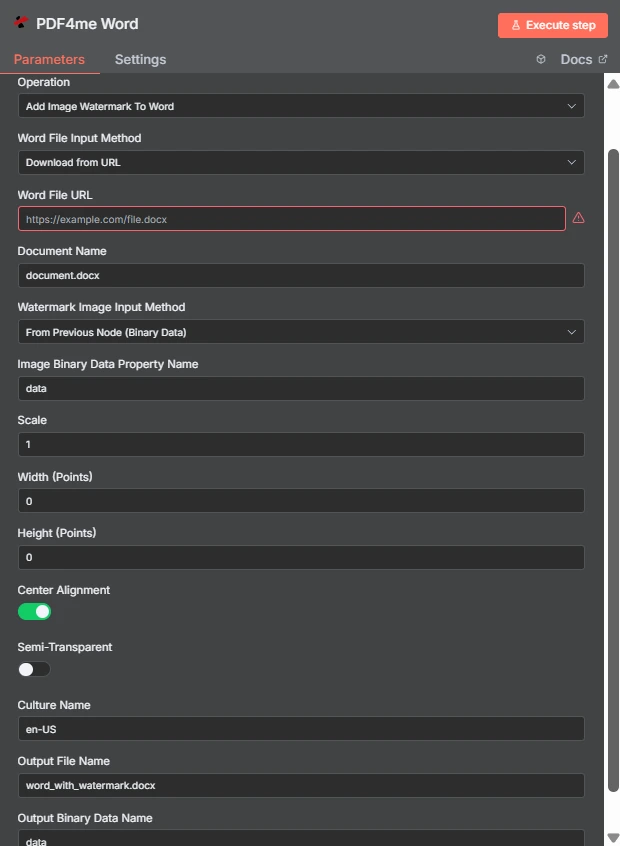
Beachten Sie die zwei unabhängigen Eingabemethoden: die Word Die Datei trifft ein per URL Das Wasserzeichenbild stammt aus dem vorherigen Knoten. Breite und Höhe sind auf 0 gesetzt, daher steuert Skalierung 1 die Größe.
Bildwasserzeichen vs. Textwasserzeichen in Word
| Frage | Bildwasserzeichen hinzufügen Word | Füge ein Textwasserzeichen hinzu Word |
|---|---|---|
| What gets stamped | An image file such as a logo, seal, or badge | A word or phrase you type, such as DRAFT |
| Second input needed | Yes, the image file itself | No, only the text string |
| Changing it per run | Swap the image binary or URL | Change the text with an expression |
| Best for | Company branding and scanned marks | Status labels and per-document text |
| Transparency control | Semi-Transparent toggle plus PNG alpha | Handled through the text styling options |
Welchen Parametern fügt das Bildwasserzeichen hinzu? Word Brauchen?
Der Word Datei und Wasserzeichenbild verfügen jeweils über ein Dropdown-Menü zur Auswahl der Eingabemethode. Unabhängig von der gewählten Methode erscheint das entsprechende Quellfeld direkt darunter, sodass sich die bedingten Zeilen darunter je nach Ihrer Auswahl ändern.
| Parameter | Erforderlich | Was es tut | Beispiel |
|---|---|---|---|
| Credential to connect with | Required | The PDF4me API credential the node authenticates with. | PDF4me account |
| Operation | Required | The action this node performs. Select Add Image Watermark To Word. | Add Image Watermark To Word |
| Word File Input Method | Required | How the .docx reaches the node: from the previous node as binary data, as a Base64 string, or downloaded from a URL. | Download from URL |
| Word File URL | Conditional | Public URL of the .docx to stamp. Appears only when the Word file input method is set to download from a URL. | https://example.com/file.docx |
| Document Name | Required | Filename of the input document including the extension. Used for format detection, so keep the .docx suffix accurate. | document.docx |
| Watermark Image Input Method | Required | How the image reaches the node. Independent of the Word file input method, so the two can differ. | From Previous Node (Binary Data) |
| Image Binary Data Property Name | Conditional | Name of the binary property holding the watermark image. Appears when the image comes from the previous node. | data |
| Scale | Optional | Size multiplier applied to the image at its natural size. Ignored when a non-zero Width or Height is supplied. | 1 |
| Width (Points) | Optional | Exact watermark width in points. Leave at 0 to size by Scale. Setting only Width keeps the aspect ratio. | 0 |
| Height (Points) | Optional | Exact watermark height in points. Leave at 0 to size by Scale. Setting only Height keeps the aspect ratio. | 0 |
| Center Alignment | Optional | Toggle that centres the watermark on the page. Ships enabled; turn it off to align to the top left within the margins. | enabled |
| Semi-Transparent | Optional | Toggle that reduces watermark opacity so page text stays readable underneath. Ships disabled. | disabled |
| Culture Name | Optional | Culture code recorded for document processing, such as en-US or de-DE. | en-US |
| Output File Name | Optional | Filename of the returned document. Keep the .docx extension so downstream steps handle it correctly. | word_with_watermark.docx |
| Output Binary Data Name | Optional | Binary property the stamped document is written to. Leave as data unless a later node expects another name. | data |
Ausgabe
| Feld | Typ | Was es enthält |
|---|---|---|
| fileName | String | Name of the returned watermarked document, taken from Output File Name. |
| fileSize | Number | Size of the returned document in bytes. A useful sanity check that the image was embedded. |
| success | Boolean | Whether the watermark was applied. Branch on this so failures surface as alerts. |
| originalFileName | String | Name of the input document as supplied in Document Name. |
| scale | Number | The scale factor actually applied, echoed back for verification. |
| alignImage | Boolean | Whether centre alignment was used, reflecting the Center Alignment toggle. |
| semiTransparent | Boolean | Whether reduced opacity was applied, reflecting the Semi-Transparent toggle. |
| cultureName | String | The culture code recorded for the operation. |
| message | String | Human-readable status text describing the result of the operation. |
Das gestempelte Dokument selbst wird als Binärdaten in der angegebenen Eigenschaft zurückgegeben. Name der Ausgabebinärdaten, bereit zum Speichern, Anhängen an eine E-Mail oder Einspeisen in ein PDF Konvertierungsschritt.
Wie richte ich das Hinzufügen eines Bildwasserzeichens ein? Word In n8n?
- Füge die PDF4me Word Fügen Sie den Knoten zu Ihrem Workflow hinzu und legen Sie fest Betrieb Zu Bildwasserzeichen hinzufügen WordDie
- Wählen Sie Ihre PDF4me Anmeldeinformationen, oder erstellen Sie welche und fügen Sie Ihre ein. API Schlüssel.
- Wähle ein Word Dateieingabemethode und liefern Sie die
.docxdurch das Feld, das darunter erscheint. - Satz Dokumentname also die
.docxDie Dateiendung ist vorhanden und korrekt. - Wähle ein Eingabemethode für Wasserzeichenbilderdann Punkt Name der Bildbinärdateneigenschaft auf dem Grundstück, auf dem sich das Bild befindet, normalerweise
dataDie - Verlassen Breite (Punkte) Und Höhe (Punkte) bei
0und anpassen Skala, oder man legt explizite Punktwerte fest, wenn die Größe exakt sein muss. - Einschalten Halbtransparent Wenn das Wasserzeichen über dem Fließtext liegt, und lassen Sie Mittelausrichtung Es sei denn, Sie möchten eine Markierung oben links.
- Satz Name der Ausgabedatei endet mit
.docx, führe den Knoten aus und leite das Ergebnis weiter.
Typische Konfigurationen
Workflow-BeispieleCommon n8n workflow patterns using Add Image Watermark To Word.
- Ein Meldeschritt erzeugt ein Word Dokument nach Zeitplan.
- Bildwasserzeichen hinzufügen Word prägt das Firmenlogo darauf.
- Die personalisierte Datei wird per E-Mail an den Verteiler gesendet.
- Ein Vertrag landet im Überprüfungsordner.
- Ein DRAFT-Abzeichenbild ist mit der Option „Halbtransparent aktiviert“ versehen.
- Rezensenten dürfen die Arbeitsfassung niemals mit der endgültigen Fassung verwechseln.
- Das Logo wird angewendet, während die Datei noch bearbeitbar ist. WordDie
- Ein Konvertierungsschritt wandelt das gestempelte Dokument in ein PDFDie
- Der PDF wird veröffentlicht, wobei das Zeichen von Anfang an integriert und nicht nachträglich darübergelegt wird.
- Eine Ordnerauflistung erzeugt ein Element pro älterer .docx-Datei.
- Der Knoten wird einmal pro Element mit demselben Wasserzeichenbild ausgeführt.
- Die gestempelten Kopien werden unter neuen Dateinamen zurückgeschrieben.
Praktische Tipps
Spickzettel
| Feld | Wert |
|---|---|
| Operation | Add Image Watermark To Word |
| Word File Input Method | Download from URL |
| Word File URL | https://example.com/file.docx |
| Document Name | document.docx |
| Watermark Image Input Method | From Previous Node (Binary Data) |
| Image Binary Data Property Name | data |
| Scale | 1 |
| Width (Points) / Height (Points) | 0 / 0 |
| Center Alignment | enabled |
| Semi-Transparent | disabled |
| Culture Name | en-US |
| Output File Name | word_with_watermark.docx |
| Output Binary Data Name | data |