AI-Kreditkartenverarbeitung n8n
AI-Kreditkarte verarbeiten ist ein PDF4me Knotenaktion in n8n das ein Kreditkartenbild liest oder PDF und gibt die Kartendaten in der strukturierten Form zurück JSON Felder. Verwenden Sie es, um Karteninhabername, Kartennummer, Ablaufdatum und ausstellende Bank anhand eines Scans oder Fotos zu erfassen, anstatt diese Daten manuell in ein Formular einzugeben.
Was dieser Knoten bewirkt
PDF4me: AI-Kreditkarte verarbeiten nimmt eine Kartendatei von Binary Data entgegen, ein Base64 Stringoder ein URL und wendet Vision an AI um ein zurückzugeben Kreditkartendaten Objekt, das die einzelnen Kartenfelder enthält. Es akzeptiert PDF, PNG, JPG, Und JPEGDa die Funktion diskrete Werte anstelle eines Textblocks zurückgibt, kann der nächste Workflow-Schritt auf ein einzelnes Feld angewendet werden, und Sie können gezielt auswählen, welche dieser Werte beibehalten werden sollen.
Authentifizierung Ihres API Anfrage
Jeder PDF4me Knoten in n8n erfordert eine gültige Anmeldeinformationen zum Verbinden mitErstellen oder wählen Sie einen Eintrag aus, der Ihre Daten enthält. PDF4me API Schlüssel, damit der Workflow Extraktionsanfragen sicher authentifizieren kann.
Wichtige Fakten, die Sie nicht verpassen sollten
"" Anstatt zu prüfen, ob ein Schlüssel existiert, sollte man auf leere Werte testen, anstatt zu prüfen, ob ein Schlüssel fehlt.Warnungen Array und Fallback verwendet Zweifelhafte Ergebnisse zur Überprüfung weiterleiten.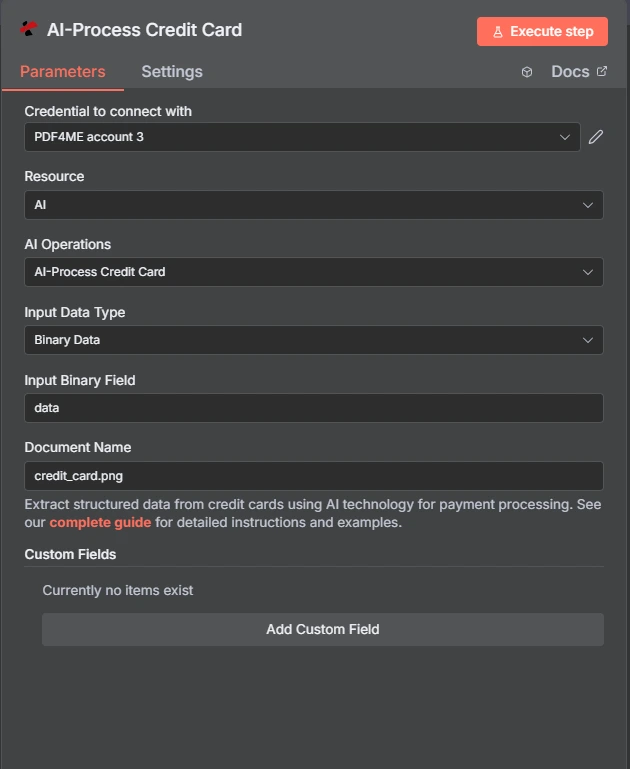
PDF4me AI-Kreditkartenaktion verarbeiten in n8n
Karte OCR im Vergleich zu einem generischen Dokumentenparser
PDF4me Es werden sowohl eine kartenspezifische Aktion als auch ein allgemeiner Parser bereitgestellt. Die kartenspezifische Aktion kennt das Aussehen einer Karte; dem allgemeinen Parser wird mitgeteilt, wonach er suchen soll.
| Aspekt | AI-Kreditkarte verarbeiten | AI Dokumentenparser |
|---|---|---|
| Field set | A fixed card schema returned as creditCardData | Whatever fields you define for the document |
| Setup effort | None, the card fields are already known | You describe the fields you want extracted |
| Best fit | Payment cards specifically | Any document shape the card action does not cover |
| Extending it | Custom Field Keys for extras beyond the card schema | Fully defined by you from the start |
Welche Parameter AI-Kreditkartenabwicklung erforderlich?
Erforderlich: Aktion, Eingabedatentyp, das Feld, das diesem Eingabetyp entspricht, und Kreditkartenname. Benutzerdefinierte Feldschlüssel sind optional.
| Parameter | Erforderlich | Was es tut | Beispiel |
|---|---|---|---|
| Action | Required | Selects the PDF4me node action to run. Choose AI-Process Credit Card. | AI-Process Credit Card |
| Input Data Type | Required | Format of the source card input. Choose Binary Data (from a previous node), Base64 String, or URL. | Binary Data |
| Input Binary Field | Conditional | Name of the binary property on the incoming n8n item that holds the card file. Required when Input Data Type is Binary Data. Defaults to data. | data |
| Base64 Credit Card Content | Conditional | Base64-encoded content of the card file. Required when Input Data Type is Base64 String. | JVBERi0xLjQKJ... |
| Credit Card URL | Conditional | Publicly reachable HTTPS URL to the card file. Required when Input Data Type is URL. | https://example.com/card.jpg |
| Credit Card Name | Required | Filename of the input file, used for format detection. Accepts .pdf, .png, .jpg, and .jpeg extensions, so give it the extension the file actually is. | card.jpg |
| Custom Field Keys | Optional | List of extra field keys to pull beyond the standard card schema. Leave empty unless the source carries values the built-in fields do not cover. | ["loyaltyId", "branchCode"] |
Ausgabefelder
Der Knoten gibt zurück JSON statt in einer Datei. Die Kartenwerte befinden sich im Inneren der Karte. creditCardData Objekt.
| Feld | Typ | Was es enthält |
|---|---|---|
creditCardData | Object | The extracted card fields. See the field breakdown below. |
jobId | String | Identifier for the AI processing job, useful when reporting an extraction problem. |
jobIdExt | String | External job identifier for third-party integration, null when unused. |
success | Boolean | True when extraction completed. Use it to branch error handling. |
message | String | Human-readable status message, carrying success confirmation or error detail. |
Felder innerhalb von creditCardData
Alle Felder, die das Modell in einem gegebenen Bild nicht lesen kann, werden als leere Zeichenkette zurückgegeben.
| Feld | Typ | Was es enthält |
|---|---|---|
cardholderName | String | Name as it appears on the card. |
cardNumber | String | The primary account number. Regulated data, so handle deliberately. |
expiryDate | String | Expiry date, typically MM/YY. |
validFrom | String | Valid-from date where the card shows one. |
validThru | String | Valid-through date, often the same as expiryDate. |
cvv | String | Card security code. The PCI DSS standard prohibits retaining this after authorisation. |
cardType | String | Card type where detected, such as credit or debit. |
cardBrand | String | Card brand where detected, such as Visa or MasterCard. |
bankName | String | Bank name printed on the card. |
issuingBank | String | Issuing bank where it can be determined separately from bankName. |
accountNumber | String | Associated account number when the source is a statement rather than a card face. |
warnings | Array | Messages about data quality or extraction difficulty on this file. |
fallbackUsed | Boolean | Whether an alternative extraction path was used. A useful low-confidence signal. |
Wie richte ich das ein? AI-Kreditkartenverarbeitung n8n?
- Hinzufügen PDF4me zu Ihrem n8n Workflow und wählen Sie den AI-Kreditkarte verarbeiten Aktion.
- In Anmeldeinformationen zum Verbinden mit, wählen Sie Ihre PDF4me Anmeldeinformationen oder klicken Neue Anmeldeinformationen erstellen und fügen Sie Ihren ein API Schlüssel.
- Satz Eingabedatentyp Zu Binärdaten (Standard), Base64 String, oder URL und das entsprechende Kartendateifeld bereitstellen.
- Satz Name der Kreditkarte mit der korrekten Dateiendung, zum Beispiel
card.jpgoderstatement.pdfDie - Optional hinzufügen Benutzerdefinierte Feldschlüssel für Werte, die über das Standardkartenschema hinausgehen.
- Führe den Knoten aus und lies die
creditCardDataObjekt aus der Antwort. - Bevor Sie etwas speichern, wählen Sie nur die Felder aus, die Sie tatsächlich benötigen, und löschen Sie den Rest.
Typische Konfigurationen
Workflow-BeispieleCommon n8n workflow patterns using AI-Process Credit Card.
- Ein Kunde lädt während der Registrierung ein Foto seiner Karte hoch.
- AI-Process Credit Card liest den Namen des Karteninhabers und das Ablaufdatum.
- Nur die nicht sensiblen Felder werden verwendet, um das Formular zur Bestätigung vorauszufüllen.
- Der Knoten verarbeitet ein hochgeladenes Kartenbild.
- Ein IF-Knoten prüft das Warnungs-Array und das FallbackUsed-Flag.
- Alles, was Zweifel hat, landet in einer Überprüfungswarteschlange, anstatt direkt weitergeleitet zu werden.
- Das Kartenbild wird einmalig zum Zeitpunkt der Aufnahme verarbeitet.
- Lediglich das Ablaufdatum und der Name des Karteninhabers werden gespeichert.
- Ein geplanter Arbeitsablauf kennzeichnet Karten, deren Gültigkeit bald abläuft, um Kontaktpersonen für die Verlängerung zu kontaktieren.
- Ein Kontoauszug PDF kommt in einem gemeinsamen Briefkasten an.
- Der Knoten extrahiert bankName und accountNumber.
- Der Kontoauszug wird dem entsprechenden Kontoauszug zugeordnet.
Praktische Tipps
Spickzettel
| Feld | Wert |
|---|---|
| Action | AI-Process Credit Card |
| Input Data Type | Binary Data |
| Input Binary Field | data |
| Credit Card Name | card.jpg |
| Custom Field Keys | (empty) |
| Accepted formats | PDF, PNG, JPG, JPEG |
| Returns | JSON with a creditCardData object |
| Credentials | PDF4me API credential |