Overlay PDFs In n8n
Overlay PDFs ist ein PDF4me Knotenaktion in n8n das platziert eins PDF aufeinander, beide auf demselben pages Statt sie anzuhängen. Verwenden Sie es, um einen gestalteten Briefkopf über generierte Inhalte zu legen, einen Zertifikatsrahmen anzuwenden oder eine genehmigte Vorlage über ein eingehendes Dokument zu legen, ohne eine einzige Seite hinzuzufügen.
Was dieser Knoten bewirkt
PDF4me: Überlagerung PDFs benötigt zwei PDFs, A Base das als Hintergrund und ein Schicht das ganz oben liegt und ein einzelnes Dokument zurückgibt, in dem beide auf demselben Blatt erscheinen. pagesJede Datei hat ihren eigenen Eingabetyp, sodass die Basis als Binärdaten von einem vorherigen Knoten stammen kann, während die Ebene von einem anderen Knoten abgerufen wird. URLIm Gegensatz zum Zusammenführen von Dokumenten erhöht sich die Seitenzahl nicht, was diese Methode zum idealen Werkzeug für Briefköpfe, Rahmen und Stempelvorlagen macht.
Authentifizierung Ihres API Anfrage
Jeder PDF4me Knoten in n8n erfordert eine gültige Anmeldeinformationen zum Verbinden mitErstellen oder wählen Sie einen Eintrag aus, der Ihre Daten enthält. PDF4me API Schlüssel, damit der Workflow Overlay-Anfragen sicher authentifizieren kann.
Wichtige Fakten, die Sie nicht verpassen sollten
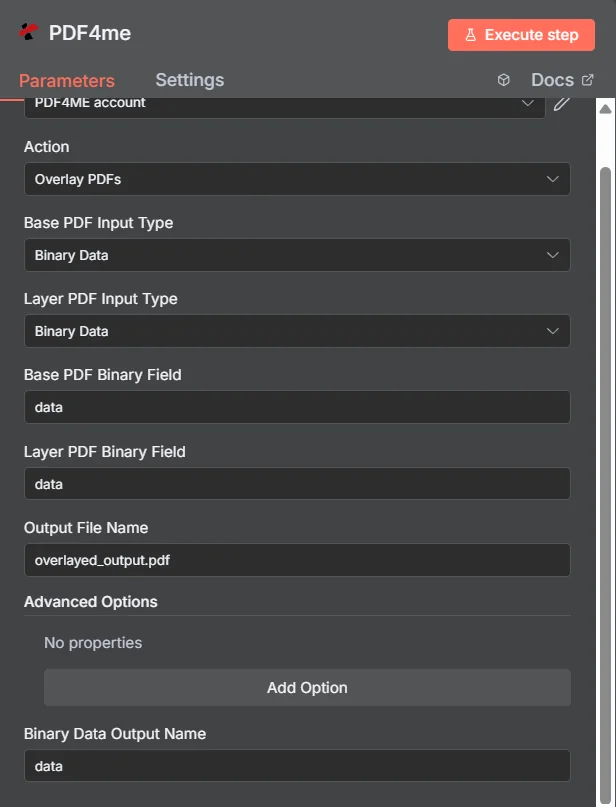
PDF4me Overlay PDFs Parameterbereich in n8n, wobei beide Eingabetypen auf Binärdaten eingestellt sind.
Überlagerung vs. Zusammenführen vs. Wasserzeichen
Drei Möglichkeiten, zusätzlichen Inhalt in ein PDF, wobei jedes Mal ein anderes Dokument entsteht.
| Ansatz | Auswirkung auf die pages | Optimale Passform |
|---|---|---|
| Overlay PDFs | Both documents appear on the same pages, page count unchanged | Branding that already exists as a designed PDF, such as a letterhead or certificate frame |
| Merge PDFs | Documents follow one another, page counts add up | Content that genuinely belongs in sequence as one longer document |
| Add watermark | Simple text or a single image drawn onto the existing pages | A short notice such as DRAFT or CONFIDENTIAL, where no designed PDF layer exists |
Welche Parameter werden überlagert? PDFs Brauchen?
Erforderlich: Die Felder „Aktion“, „beide Eingabetypen“, „das Quellfeld, das zu jedem Eingabetyp passt“ und „Ausgabedateiname“ sowie „Ausgabename für Binärdaten“ und alle Optionen unter „Erweiterte Optionen“ enthalten standardmäßige Arbeitswerte.
| Parameter | Erforderlich | Was es tut | Beispiel |
|---|---|---|---|
| Action | Required | Selects the PDF4me node action to run. Choose Overlay PDFs. | Overlay PDFs |
| Base PDF Input Type | Required | Format of the background PDF. Choose Binary Data, Base64 String, or URL. Independent of the layer setting. | Binary Data |
| Layer PDF Input Type | Required | Format of the PDF placed on top. Choose Binary Data, Base64 String, or URL. Independent of the base setting. | Binary Data |
| Base PDF Binary Field | Conditional | Name of the binary property holding the base PDF. Required when Base PDF Input Type is Binary Data. | data |
| Layer PDF Binary Field | Conditional | Name of the binary property holding the layer PDF. Required when Layer PDF Input Type is Binary Data. | data |
| Base PDF Base64 Content | Conditional | Base64-encoded content of the base PDF. Required when Base PDF Input Type is Base64 String. | JVBERi0xLjQK... |
| Layer PDF Base64 Content | Conditional | Base64-encoded content of the layer PDF. Required when Layer PDF Input Type is Base64 String. | JVBERi0xLjQK... |
| Base PDF File URL | Conditional | Publicly reachable HTTPS URL to the base PDF. Required when Base PDF Input Type is URL. | https://example.com/base.pdf |
| Layer PDF File URL | Conditional | Publicly reachable HTTPS URL to the layer PDF. Required when Layer PDF Input Type is URL. | https://example.com/letterhead.pdf |
| Output File Name | Required | Filename for the combined PDF. Include the .pdf extension. | overlayed_output.pdf |
| Binary Data Output Name | Optional | Name of the binary property the output item exposes. Defaults to data. | data |
| Advanced Options | Optional | Collection for extra processing settings, added with Add Option. Leave empty unless you have a specific requirement. | No properties |
Ausgabefelder
Ein erfolgreicher Lauf bringt eins zurück n8n Gegenstand, der die kombinierte PDFDie
| Feld | Typ | Was es enthält |
|---|---|---|
Binary (data) | Binary | The combined PDF with the layer placed over the base, under Binary Data Output Name (default data). |
fileName | String | Generated filename, matching Output File Name. |
mimeType | String | MIME type of the output, always application/pdf. |
fileSize | Number | Size of the combined PDF in bytes. |
docName | String | Document name reference for the processed file, matching fileName. |
overlayCompleted | Boolean | Confirms the overlay operation finished, useful as an explicit check that the layer was applied. |
layersProcessed | Number | Count of PDF layers combined into the final document. |
success | Boolean | True when the operation completed, false on failure. Use it to branch error handling. |
message | String | Human-readable status message, carrying success confirmation or error detail. |
Wie richte ich ein Overlay ein? PDFs In n8n?
- Hinzufügen PDF4me zu Ihrem n8n Workflow und wählen Sie den Overlay PDFs Aktion.
- In Anmeldeinformationen zum Verbinden mit, wählen Sie Ihre PDF4me Anmeldeinformationen oder klicken Neue Anmeldeinformationen erstellen und fügen Sie Ihren ein API Schlüssel.
- Satz Basis PDF Eingabetyp Und Schicht PDF EingabetypSie sind unabhängig, daher kann jede Datei auf unterschiedliche Weise ankommen.
- Füllen Sie die entsprechenden Quellfelder aus, zum Beispiel Basis PDF Binärfeld Und Schicht PDF Binärfeld, beide standardmäßig
dataDie - Satz Name der Ausgabedatei (muss enden in
.pdf). - Führe den Knoten aus und leite die kombinierte PDF, ausgesetzt unter Name der Binärdatenausgabezum nächsten Schritt.
Typische Konfigurationen
Workflow-BeispieleCommon n8n workflow patterns using Overlay PDFs.
- Es wird ein Dokument aus einer Vorlage ohne Branding generiert.
- Overlay PDFs verwendet den genehmigten Briefkopf PDF abgerufen von einem URL als die Schicht.
- Das Markenprodukt wird ausgeliefert, ohne dass ein Designer daran mitgewirkt hat.
- Die Daten zum Kursabschluss ergeben ein einfaches PDF mit dem Namen des Empfängers.
- Overlay PDFs legt den entworfenen Zertifikatsrand darüber.
- Jedes fertige Zertifikat wird per E-Mail an den Empfänger versendet.
- Ein Dokument schließt einen Genehmigungsschritt im Arbeitsablauf ab.
- Overlay PDFs bringt eine vordefinierte, genehmigte Stempelschicht an.
- Die abgestempelte Kopie wird im Archiv abgelegt.
- Ein Loop-Over-Items-Knoten durchläuft einen Ordner mit eingehenden Lieferantendokumenten.
- Overlay PDFs wendet die gleiche Schicht an PDF von einem URL jedem einzelnen.
- Alle Dokumente werden mit einheitlicher Rahmung in das Archiv aufgenommen.
Praktische Tipps
Spickzettel
| Feld | Wert |
|---|---|
| Action | Overlay PDFs |
| Base PDF Input Type | Binary Data |
| Layer PDF Input Type | Binary Data |
| Base PDF Binary Field | data |
| Layer PDF Binary Field | data |
| Output File Name | overlayed_output.pdf |
| Binary Data Output Name | data |
| Advanced Options | No properties |
| Credentials | PDF4me API credential |