Erstellen ZUGFeRD Rechnung in Make
Erstellen ZUGFeRD Rechnung ist ein Make Modul von PDF4me das Hybride erzeugt ZUGFeRD/Factur-X E-Rechnungen von CSV, JSON, oder XML Rechnungsdaten. Verwenden Sie diese, um eine Rechnung zu erstellen. PDF/A-3 Dokument mit maschinenlesbarer XML innen eingebettet, ausgerichtet auf EN 16931 Europäischer Standard für elektronische Rechnungen. Wählen Sie die Konformitätsstufe und Spezifikationsversion, die den Anforderungen Ihres Käufers oder Ihrer Kundin entsprechen. ERP Systemanforderungen.
Was dieses Modul bewirkt
PDF4meErstellen Sie ein ZUGFeRD Rechnung Erstellt hybride E-Rechnungen direkt in Ihrem Make Szenario. Rechnungsdaten bereitstellen als CSV, JSON, oder XMLDas Modul erzeugt ein PDF/A-3 Dokument mit maschinenlesbarer ZUGFeRD XML darin eingebettete Dateioder ein XML-nur Ausgabe für ERP Systeme, die ihr eigenes Rendering übernehmen. Das Ergebnis stimmt mit dem überein. EN 16931 Europäischer Standard für elektronische Rechnungsstellung und wird akzeptiert als Factur-X in Frankreich und auf den EU-Märkten. Konformitätsstufen und Spezifikationsversionen sind konfigurierbar und entsprechen exakt den Anforderungen Ihres Käufers oder öffentlichen Auftraggebers.
Authentifizierung Ihres API Anfrage
Jeder PDF4me Modul in Make erfordert eine gültige VerbindungErstellen oder wählen Sie einen Eintrag aus, der Ihre Daten enthält. PDF4me API Schlüssel, damit das Szenario den Rechnungsgenerierungsdienst sicher aufrufen kann.
Wichtige Fakten, die Sie nicht verpassen sollten
Das Hybrid-Ergebnis ist ein PDF/A-3 Dokument. das ZUGFeRD XML ist als konformer Anhang in die Datei eingebettet. ERP Systeme extrahieren die XML automatisch; Menschen können sie aber weiterhin öffnen und lesen. PDF in jedem Standard-Viewer. Einstellen Rechnung als PDF ausgeben Ja, um die Rechnungspositionen visuell auf der Seite darzustellen.
Version 1.0 unterstützt BASIS, KOMFORT, ERWEITERTVersion 2+ erweitert sich auf MINIMUM, BASICWL, BASIC, EN16931, ERWEITERT, XRECHNUNGDie XRECHNUNG Und EN16931 Für die Rechnungsstellung im öffentlichen Sektor in Deutschland sind entsprechende Dokumente erforderlich. Version und Versionsstufe müssen stets den Anforderungen des Käufersystems entsprechen.
Auswahl XML zeigt die Rechnungs-XML-Daten Feld; JSON zeigt Rechnungsdaten im JSON-Format an; CSV Zeigt Rechnungsdaten im CSV-Format an. Füllen Sie nur die Felder aus, die dem gewählten Format entsprechen. Bei Verwendung XML Format, das Modul stellt auch ein Datei Radio, damit Sie das XML direkt von Dropbox oder über ein vorheriges Modul.
Welche ZUGFeRD Welche Version soll ich verwenden?
Das Modul unterstützt zwei Spezifikationsversionen. Für die meisten neuen Integrationen sollte Version 2.0 oder höher verwendet werden; Version 1.0 wird für die Kompatibilität mit älteren Systemen beibehalten.
ZUGFeRD 2.0+ EMPFOHLEN
Aktuelle Spezifikation. Konformitätsstufen: MINIMUM, BASICWL, BASIC, EN16931 (Comfort, die deutsche Rechtsnorm), ERWEITERT, XRECHNUNG. Kompatibel mit Factur-XKombinieren Sie es mit dem 2.0 XML Probe, 2.0 EN16931 JSON Probe, oder 2.0 CSV ProbeDie folgenden Screenshots zeigen die Benutzeroberfläche von Version 2.0+ genau so, wie sie heute dargestellt wird.
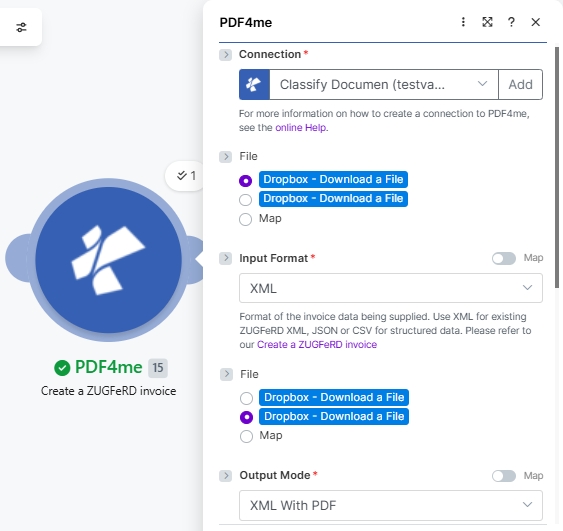
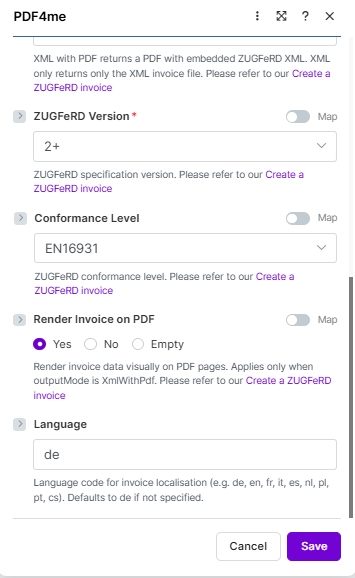
ZUGFeRD 1.0 VERMÄCHTNIS
Vorher-EN 16931 Spezifikationskonformitätsstufen: BASIC, KOMFORT, ERWEITERTNur verwenden, wenn ein Empfänger ERP oder das Käufersystem erfordert explizit Version 1.0 (selten nach 2022). Passend dazu 1.0 XML Probe, Die grundlegend JSON Probeoder die 1.0 CSV ProbeAlle anderen Felder funktionieren gleich; nur die Auswahlliste für die Konformitätsstufe ändert sich.
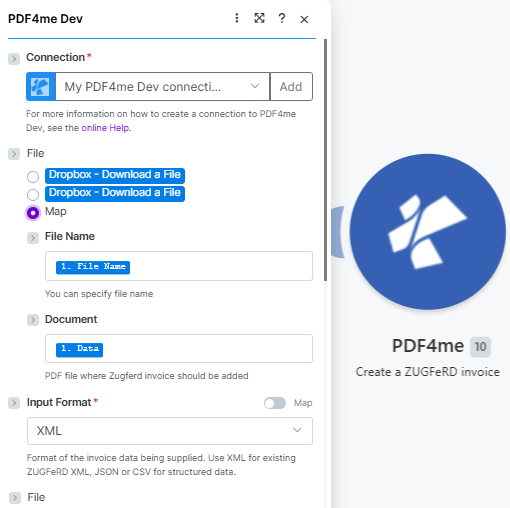
Beginnen Sie mit VerbindungDann kartieren Sie die Basis PDF (Dateiname, Dokumentierenund setzen Eingabeformat (Hier XML).
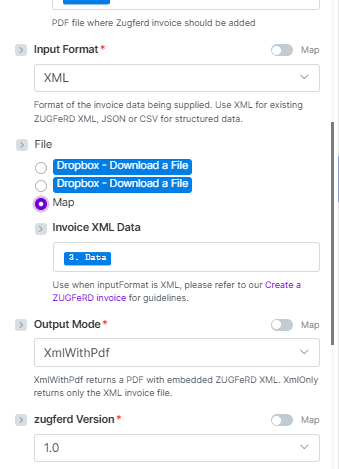
Mit Datei = Karte, Karte Rechnungs-XML-Daten, Satz Ausgabemodus (XmlWithPdf oder Nur XML), dann wählen zugferd Version (Hier 1.0).
Parameter
Erforderlich: Verbindung, Eingabeformat, Ausgabemodus, ZUGFeRD VersionDas Rechnungsdatenfeld (Rechnungs-XML-Daten, Rechnungs-JSON-Daten, oder Rechnungsdaten (CSV-Datei)) wird dynamisch basierend auf Ihrer Auswahl des Eingabeformats angezeigt. Nur das entsprechende Feld muss ausgefüllt werden.
Warum Datei Erscheinen sie zweimal in den Screenshots der Version 2.0+? Wenn das Eingabeformat XML und die Datei ist auf eingestellt KarteDas Modul rendert einen zweiten Dateiauswahldialog, sodass Sie beide (a) die Basisdatei zuordnen können. PDF Die ZUGFeRD Die Rechnung sollte eingebettet werden in (b) die Quelle ZUGFeRD XML Datei. Beide Auswahlfelder zeigen dieselben Optionsfelder an. Wenn das Eingabeformat ist JSON oder CSV Der zweite Picker wird durch den entsprechenden ersetzt. Rechnungs-JSON-Daten oder Rechnungsdaten (CSV-Datei) Textfeld.
| Parameter | Erforderlich | Was es tut | Beispiel / Optionen |
|---|---|---|---|
| Connection | Required | PDF4me API connection used to authenticate invoice generation requests. Click Add and paste your API key if connecting for the first time. | Your PDF4me connection |
| File | Conditional | Source of the base PDF where the ZUGFeRD invoice will be embedded (when Output Mode is XmlWithPdf). Radio button with two options: Dropbox - Download a File (pulls directly from a Dropbox account without a prior download step) or Map (supplies the PDF from a prior module. Dropbox, Google Drive, OneDrive, HTTP, etc.). Choose Map for the most flexible workflow. When Map is selected, the two sub-fields below appear. | Map |
| File → File Name | Conditional | Sub-field of File (visible when Map is selected). Filename of the base PDF including the .pdf extension. Map from the prior module's filename output. for example, the File Name field of a Dropbox or Google Drive Download module. | 1. File Name |
| File → Document | Conditional | Sub-field of File (visible when Map is selected). Binary PDF content where the ZUGFeRD XML will be embedded. Map from the prior module's binary data field. typically the Data field of Dropbox, Google Drive, or OneDrive download modules. Hint shown in module: "PDF file where Zugferd invoice should be added". | 1. Data |
| Input Format | Required | Format of the invoice data being supplied. Use XML for existing ZUGFeRD XML; JSON or CSV for structured data. Hint: "Format of the invoice data being supplied. Use XML for existing ZUGFeRD XML, JSON or CSV for structured data." | XML sampleXML 2.0 sampleJSON 2.0 EN16931 sampleJSON (basic)CSV sampleCSV 2.0 sample |
| Invoice XML Data | Conditional | The ZUGFeRD XML invoice content to embed. Appears when Input Format = XML and File = Map. Hint: "Use when inputFormat is XML, please refer to our Create a ZUGFeRD invoice for guidelines." Map from a prior Dropbox download or HTTP module output. | XML sampleXML 2.0 sample3. Data (mapped) |
| Invoice JSON Data | Conditional | Structured invoice data in JSON format. Appears when Input Format = JSON. Map a JSON string from a Google Sheets, Airtable, or HTTP module. See sample JSON below. | JSON 2.0 EN16931 sampleJSON (basic)(mapped JSON string) |
| Invoice CSV Data | Conditional | Invoice row data in CSV format. Appears when Input Format = CSV. Map a CSV row from an iterator, Google Sheets, or file download module. See sample CSV below. | CSV sampleCSV 2.0 sample(mapped CSV row) |
| Output Mode | Required | XML With PDF (a.k.a XmlWithPdf in API requests) returns a PDF/A-3 file with the ZUGFeRD XML embedded inside, the standard hybrid e-invoice. XML Only (XmlOnly) returns just the XML invoice file without a PDF wrapper. Hint shown in module: "XML with PDF returns a PDF with embedded ZUGFeRD XML. XML only returns only the XML invoice file." | XML With PDF |
| ZUGFeRD Version | Required | ZUGFeRD specification version. Set to match what the recipient ERP or buyer system expects. Latest is 2+; legacy 1.0 also supported. The two have different conformance level sets (see table below). | 2+ |
| Conformance Level | Optional | ZUGFeRD conformance profile. Available levels differ by version. For 2+, EN16931 (Comfort) is the default for German legal e-invoicing compliance. See the Conformance Level Reference table below. Defaults to BASIC if not specified. | EN16931 |
| Render Invoice on PDF | Optional | When set to Yes, invoice line items are drawn visually on the PDF pages. Applies only when Output Mode is XmlWithPdf. Options: Yes, No, Empty. Hint: "Render invoice data visually on PDF pages. Applies only when outputMode is XmlWithPdf." | Yes |
| language | Optional | Two-letter locale code for invoice label localisation. Supported: de, en, fr, it, es, nl, pl, pt, cs. Hint: "Language code for invoice localisation (e.g. de, en, fr, it, es, nl, pl, pt, cs). Defaults to de if not specified." | de |
Konformitätsniveau-Referenz
Die verfügbaren Konformitätsstufen unterscheiden sich um zugferd VersionPassen Sie das Niveau immer an die Bedürfnisse Ihres Käufers an. ERP Systemanforderungen.
| Ebene | Verwenden Sie es, wenn |
|---|---|
BASIC | Mandatory EN 16931 fields only. Widest compatibility, safe default. |
COMFORT | Adds optional fields for line-item detail and additional references. |
EXTENDED | Full field set for complex B2B invoices with delivery, allowances, and charges. |
| Ebene | Verwenden Sie es, wenn |
|---|---|
MINIMUM | Absolute minimum fields. Buyer reference and totals only. |
BASICWL | BASIC without line items. Header-level data only. |
BASIC | Mandatory EN 16931 fields. Recommended starting point. |
EN16931 | Full EN 16931 compliance for cross-border and public sector. |
EXTENDED | Full field set including German-specific extensions. |
XRECHNUNG | German public-sector e-invoice mandate (XRechnung profile). |
Beispielrechnungsdateien
Verwenden Sie diese Beispieldateien, um das Modul mit jedem Eingabeformat zu testen, bevor Sie Ihre Live-Datenquelle anschließen. Für deutsche B2B-Produktionsworkflows beginnen Sie mit sample-invoice-zugferd-2.0-en16931.json (ZUGFeRD 2.0, EN16931 Konformität).
ZUGFeRD-invoice-sample.xmlZUGFeRD-invoice-sample-2.0.xmlsample-invoice-zugferd-2.0-en16931.jsonsample-invoice.jsontest-invoice.csvzugferd-invoice-2.0.csvCSV Spaltenreferenz
Der CSV Die Eingabe muss in genau dieser Spaltenreihenfolge erfolgen. Jede Zeile erzeugt eine Rechnung.
| Spalte | Beschreibung | Beispiel |
|---|---|---|
InvoiceId | Unique invoice identifier | INV-2025-001 |
IssueDate | Invoice issue date (YYYY-MM-DD) | 2025-01-15 |
SellerName | Seller company name | Test Company |
SellerStreet | Seller street address | 123 Main St |
SellerCity | Seller city | Test City |
SellerPostalCode | Seller postal / ZIP code | 12345 |
SellerCountry | ISO 3166-1 alpha-2 country code | DE |
SellerVatId | Seller VAT registration number | DE123456789 |
BuyerName | Buyer company or person name | Customer Inc |
BuyerStreet | Buyer street address | 456 Oak Ave |
BuyerCity | Buyer city | Customer City |
BuyerPostalCode | Buyer postal / ZIP code | 67890 |
BuyerCountry | ISO 3166-1 alpha-2 country code | DE |
ProductName | Line item product or service name | Test Product |
Quantity | Quantity of the line item | 10.0 |
UnitPrice | Net unit price | 9.90 |
TaxPercent | VAT / tax percentage | 19.0 |
Currency | ISO 4217 currency code | EUR |
PaymentReference | Payment reference string | PAY-REF-001 |
IBAN | Payee IBAN for bank transfer | DE08700901001234567890 |
BIC | Payee bank BIC / SWIFT code | GENODEF1M04 |
JSON Rechnungsstruktur
Bei Verwendung Eingabeformat: JSONDie Nutzdaten müssen die folgenden Schlüssel der obersten Ebene enthalten. Alle verschachtelten Objekte und Arrays entsprechen der Struktur der Beispieldatei.
| Schlüssel | Typ | Beschreibung |
|---|---|---|
InvoiceId | String | Unique invoice number, e.g. "471102" |
IssueDate | String (ISO 8601) | Invoice date, e.g. "2013-03-05T00:00:00" |
InvoiceType | String | Document type label, e.g. "RECHNUNG" |
TypeCode | String | UN/EDIFACT document type code. 380 for standard invoice |
IsTest | Boolean | true for test runs, false / omit for production |
Notes | Array of strings | Free-text notes shown in the invoice header (payment terms, GLN, etc.) |
Seller | Object | Seller party: Name, Address (Street, City, PostalCode, Country), TaxId, VatId, GLN |
Buyer | Object | Buyer party: Name, Address (Street, City, PostalCode, Country, LineTwo), GLN |
Payment | Object | Payment details: PaymentReference, Currency, IBAN, BIC |
DeliveryDate | String (ISO 8601) | Actual delivery date, e.g. "2013-03-05T00:00:00" |
LineItems | Array of objects | Invoice lines. each with Quantity, UnitCode, UnitPrice, LineTotal, ProductName, GTIN, SellerProductId |
Totals | Object | Monetary totals: LineTotal, ChargeTotal, AllowanceTotal, TaxBasisTotal, TaxTotal, GrandTotal, TaxPercent, Currency |
Wie erstelle ich ein ZUGFeRD Rechnung in Make?
- Hinzufügen PDF4me → Erstellen Sie einen ZUGFeRD Rechnung zu Ihrem Szenario.
- Wählen Verbindung (oder klicken Sie hier) Hinzufügen um einen mit Ihrem API Schlüssel).
- Wählen EingabeformatDie XML, JSON, oder CSVDas angezeigte Datenfeld hängt von dieser Auswahl ab.
- Satz Datei Zu Karte und verbinden Sie das Rechnungsdatenfeld (Rechnungs-XML-Daten / JSON-Daten / CSV-Daten) aus der Ausgabe des vorherigen Moduls. Oder wählen Sie Dropbox – Datei herunterladen um die Datei direkt aus Dropbox abzurufen.
- Satz Ausgabemodus Zu XmlWithPdf für einen Hybrid PDF/A-3 Rechnung oder Nur XML für XML nur.
- Satz zugferd Version (1.0 oder 2+) dann auswählen Konformitätsgrad aus dem versionsspezifischen Satz. Beginnen Sie mit BASICDie
- Bei Verwendung von XmlWithPdf: einstellen Rechnung als PDF ausgeben Zu Ja Linienelemente visuell zeichnen und festlegen Sprache zu Ihrem Zielgebietsschema (z.B.
de,en,fr). - Speichern und klicken Einmal ausführen. Leiten Sie die Dokumentdaten Ausgabe an Dropbox, Google Drive, ERP Webhook oder ein E-Mail-Modul.
Ausgabefelder
| Feld | Typ | Was es enthält |
|---|---|---|
Document Name | String | Filename of the generated invoice file. e.g. invoice-471102.pdf or invoice-471102.xml. |
Document Data | Buffer | Binary content of the ZUGFeRD hybrid PDF/A-3 or XML file. Map into an upload, email attachment, or ERP HTTP module for the next step in your scenario. |
Workflow-Beispiele
Workflow-BeispieleCommon Make scenario patterns using Create ZUGFeRD Invoice for automated e-invoicing.
- Eine Bestellung wird in Ihrem Konto als versendet markiert. ERP oder Airtable. Das Szenario wird ausgelöst.
- Artikelpositionen, Preise, Käuferadresse und Steuerdaten werden abgerufen und zu einem Dokument zusammengeführt. JSON Nutzlast.
- Erstellen ZUGFeRD Rechnung Läuft mit Eingabeformat JSONAusgabemodus XmlWithPdf, Version Ab 2 JahrenKonformitätsniveau BASIC, Sprache
vonDie - Der Hybrid PDF wird dem Käufer per E-Mail über Gmail zugesandt und eine Kopie wird im Rechnungsarchiv in Google Drive hochgeladen.
- Die Buchhaltung lässt einen fallen CSV Datei mit monatlichen Rechnungen in Dropbox hochladen.
- Ein Watch Files-Trigger erkennt die neue Datei und ein Iterator verarbeitet jede Zeile.
- Erstellen ZUGFeRD Rechnung Läuft pro Zeile mit Eingabeformat CSVwodurch ein Hybrid entsteht PDF pro Rechnung.
- Alle PDFs werden in einen strukturierten Archivordner hochgeladen und eine E-Mail mit einer Abschlusszusammenfassung wird an das Finanzteam gesendet.
- Eine Rechnung für einen Regierungsauftrag wird durch einen Airtable-Datensatz ausgelöst.
- Erstellen ZUGFeRD Rechnung Läuft mit Eingabeformat JSONAusgabemodus Nur XML, Version Ab 2 JahrenKonformitätsniveau XRECHNUNGDie
- Der XML Die Datei wird per POST-Anfrage direkt an den Peppol-kompatiblen Rechner des Käufers gesendet. ERP API über ein HTTP Modul.
- Eine Erfolgs- oder Fehlermeldung wird in einem Google Sheet protokolliert, damit das Finanzteam sie überprüfen kann.