ZUGFeRD E-Invoice from an Airtable Base: Build the JSON and Email the Hybrid PDF in Make with PDF4me
PDF4me Create a ZUGFeRD invoice is a Make module that turns structured invoice data into a hybrid PDF/A-3 e-invoice. Pointed at an Airtable base, it reads one row, converts it to EN 16931 XML, returns a file that is both readable and machine-parseable, and puts it back on the record.
Search for e-invoicing software and you get a vendor comparison: platforms, suites, per-document pricing. Search for whether Airtable can make invoices and you get a long thread explaining that it cannot. Between those two results sits a team that already runs on Airtable, has just been told their invoices must be machine-readable, and does not want to migrate their operations into an invoicing platform to satisfy a format requirement. This scenario is for them.
A row lands in an Airtable table with a seller, a buyer, one line item and the totals. Make picks it up, builds a compact JSON object from the columns, and PDF4me turns that into a PDF/A-3 with EN 16931 XML embedded inside it. The file goes back onto the record as an attachment and out to the buyer by email. Five modules, and nobody writes XML.
Why-Based Q&A
Why run this from Airtable rather than an invoicing product? Because the invoice data is usually a by-product of work already tracked somewhere. If the project, the client and the agreed rate live in a base, that base is the nearest thing to a source of truth you have. Moving it into a product to satisfy a file format means keeping the same customer in two places forever.
Why describe the invoice as JSON instead of writing the XML? Because Cross Industry Invoice syntax is long, deeply nested and unforgiving about where each code sits. The JSON object says the same thing in a fraction of the space with keys that read like business terms, and PDF4me generates the conformant XML from it. The part that is easy to get wrong is the part you do not maintain.
Why does the hybrid file matter? Because the invoice has two audiences. The buyer's accounting system reads the embedded XML and books the document without anyone keying it in; the person in accounts payable opens the same file and sees a page. One artefact satisfies both, which is why FeRD, the German forum behind the format, built it that way rather than specifying XML alone.
Why attach the result back to the record? Because an e-invoice you cannot find later is a problem you have merely postponed. Putting the PDF in the Document field on the row ties the artefact to the data that produced it, which is exactly what you want when a buyer disputes a figure eighteen months on.
What You'll Get
Input: an Airtable row with the invoice number, the dates, a seller block, a buyer block, one line item and the totals, with Status set to New. Output: a ZUGFeRD PDF/A-3 attached to that record, and an email to the buyer carrying the same file.

One row per invoice. Every column here becomes a key in the JSON the scenario builds.
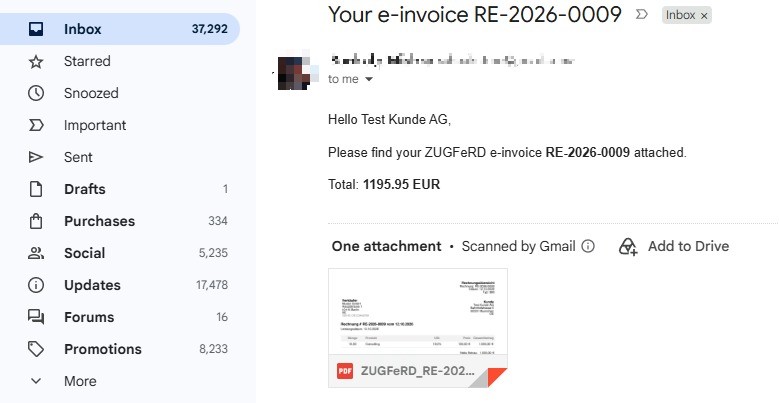
The buyer sees a normal invoice. Their software sees the XML inside it.
What You Need
- A Make account. Open Make. Five modules on standard apps.
- PDF4me API key. Get your API key. One PDF4me connection covers the scenario.
- An Airtable base. The captured base is
PDF4me Live Automationswith a table namedZUGFeRD Requests, carrying the invoice header, the seller block including a VAT ID, the buyer block, the line item fields, the totals, an Email column, a Status field and an attachment field calledDocument. - A Gmail account for delivery, connected to Make.
- Your seller details including a VAT ID. They come from columns, so one base can invoice for more than one legal entity.
The Scenario at a Glance
- Watch records (Airtable) picks up new rows in
ZUGFeRD Requests. - Create a ZUGFeRD invoice (PDF4me) converts the JSON into a hybrid PDF.
- Upload an attachment (Airtable) attaches it to the
Documentfield on the same row. - Update a record (Airtable) writes the outcome back.
- Send an email (Gmail) delivers the e-invoice to the buyer.
Complete scenario overview
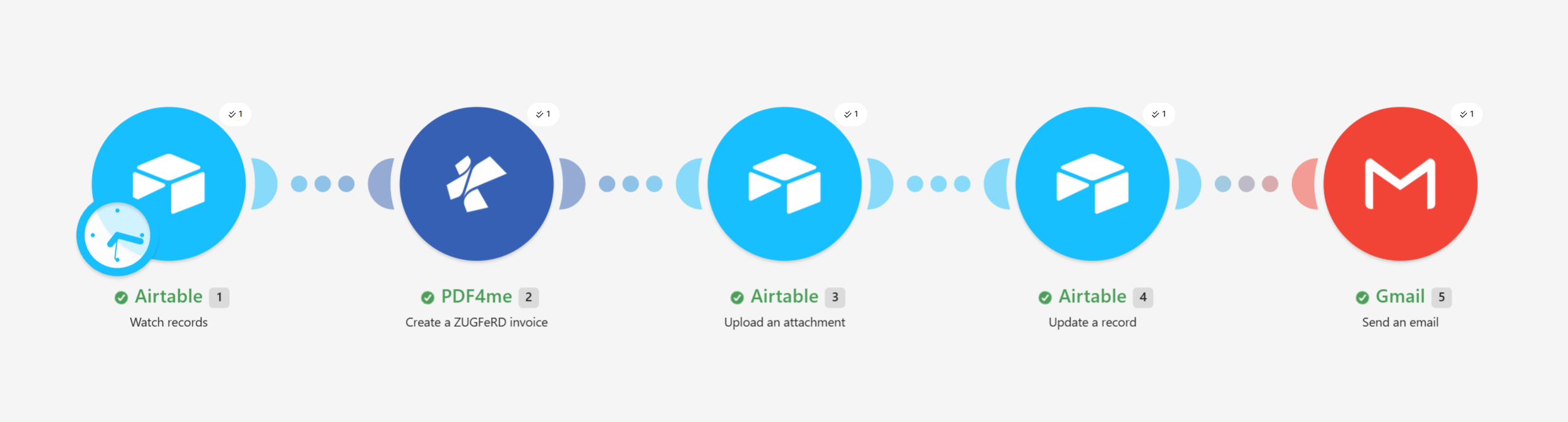
The same five-module shape as the Swiss QR scenario. Only the PDF4me module in the middle differs.
Step 1: How do you trigger a scenario from an Airtable row?
Flow so far: nothing yet, this is the trigger.
A row marked ready is the request to issue an invoice.
- Add Airtable > Watch records as the trigger.
- Configure:
- Base:
PDF4me Live Automations - Table:
ZUGFeRD Requests - Trigger field:
Created - Label field:
Title - Limit:
10 - Formula:
{Status}='New'
- Base:
Watch records configuration
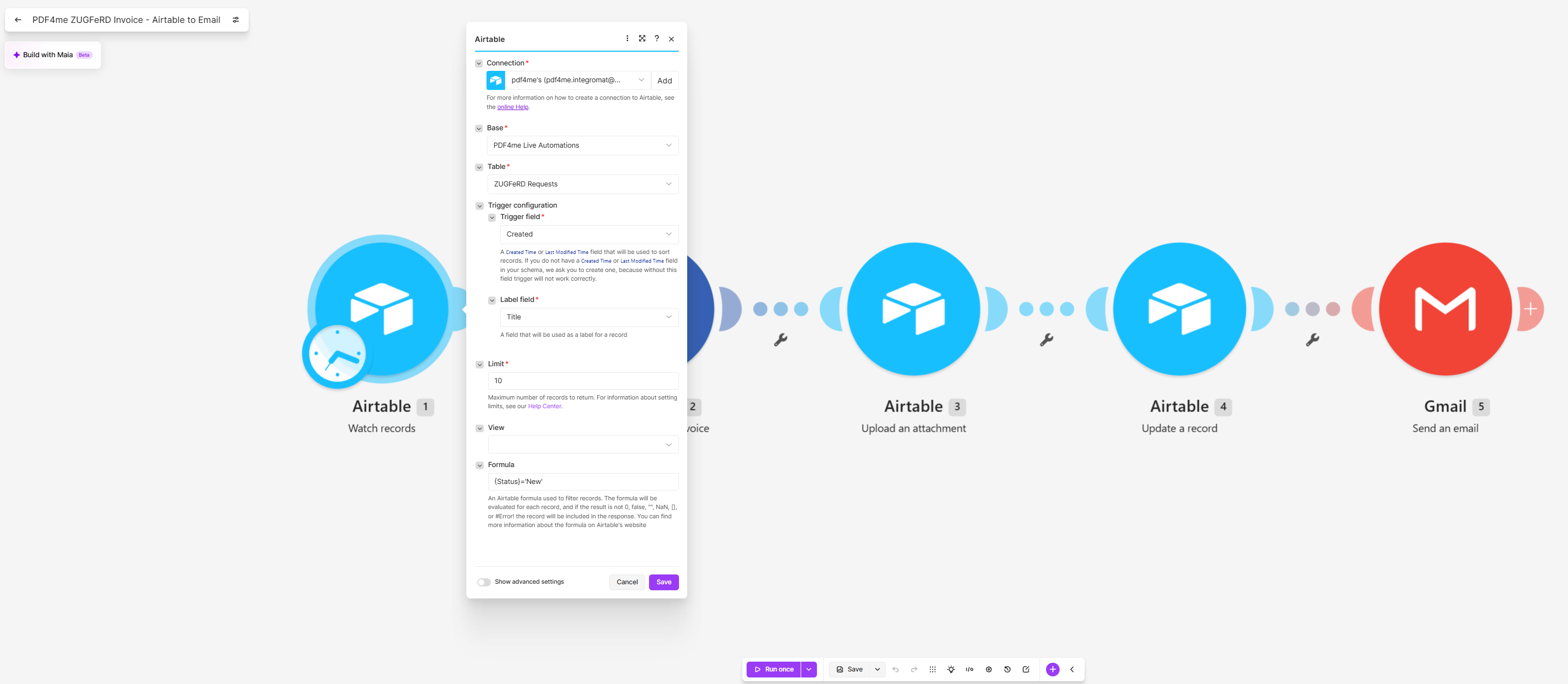
Status is the switch. Nothing is issued until a person sets a row to New.
Step 2: How do you turn a row into a ZUGFeRD invoice?
Flow so far: the Airtable trigger.
This is the module that produces the e-invoice. The settings decide the format; the JSON decides the content.
- Add PDF4me > Create a ZUGFeRD invoice.
- Configure the output:
- File Name:
ZUGFeRD_plus the InvoiceNumber plus.pdf - Input Format:
JSON - Output Mode:
XML With PDF - ZUGFeRD Version:
2* - Conformance Level:
EN16931 - Render Invoice on PDF:
Yes
- File Name:
- Paste the invoice object into Invoice JSON Data and map the columns in:
{
  "InvoiceId": "{{1.InvoiceNumber}}",
  "TypeCode": "380",
  "InvoiceType": "RECHNUNG",
  "IssueDate": "{{formatDate(1.InvoiceDate; "YYYY-MM-DD")}}T00:00:00",
  "DeliveryDate": "{{formatDate(1.InvoiceDate; "YYYY-MM-DD")}}T00:00:00",
  "IsTest": false,
  "Seller": {
    "Name": "{{1.SellerName}}",
    "VatId": "{{1.SellerVATID}}",
    "Address": {
      "Street": "{{1.SellerStreet}}",
      "PostalCode": "{{1.SellerPostalCode}}",
      "City": "{{1.SellerCity}}",
      "Country": "{{1.SellerCountry}}"
    }
  },
  "Buyer": {
    "Name": "{{1.BuyerName}}",
    "Address": {
      "Street": "{{1.BuyerStreet}}",
      "PostalCode": "{{1.BuyerPostalCode}}",
      "City": "{{1.BuyerCity}}",
      "Country": "{{1.BuyerCountry}}"
    }
  },
  "LineItems": [
    {
      "ProductName": "{{1.ItemDescription}}",
      "Quantity": {{1.Quantity}},
      "UnitCode": "C62",
      "UnitPrice": {{1.UnitPrice}},
      "LineTotal": {{parseNumber(1.NetTotal; ".")}}
    }
  ],
  "Totals": {
    "Currency": "{{1.Currency}}",
    "LineTotal": {{parseNumber(1.NetTotal; ".")}},
    "TaxBasisTotal": {{parseNumber(1.NetTotal; ".")}},
    "TaxPercent": {{1.VATRate}},
    "TaxTotal": {{parseNumber(1.VATAmount; ".")}},
    "GrandTotal": {{parseNumber(1.GrossTotal; ".")}},
    "ChargeTotal": 0,
    "AllowanceTotal": 0
  },
  "Payment": {
    "Currency": "{{1.Currency}}",
    "PaymentReference": "{{1.InvoiceNumber}}",
    "DueDate": "{{formatDate(1.DueDate; "YYYY-MM-DD")}}T00:00:00"
  }
}
Three parts of that object are worth pausing on. TypeCode 380 is the code for a commercial invoice and is fixed, not derived from anything in the base. UnitCode C62 is the UN/ECE code for "one of something", which is what you want for hours or units of service. And the Payment block at the end carries PaymentReference, the text the buyer quotes when they pay, which here is simply the invoice number.
Create a ZUGFeRD invoice configuration
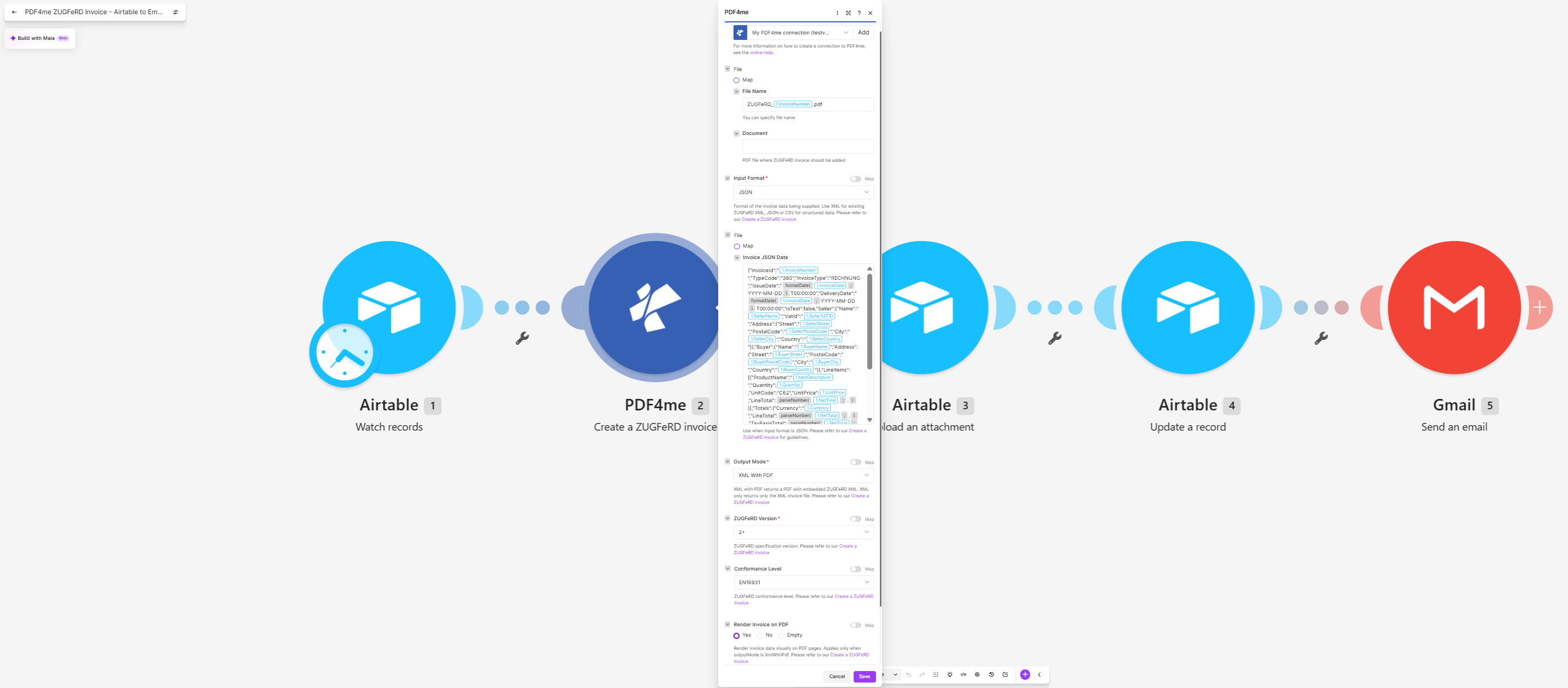
The field scrolls in the editor, so only part of the object is visible at once. The block above is the whole of it.
What each setting decides
| Field | Value here | What it controls |
|---|---|---|
| Input Format | JSON | That you supply a structured object rather than ready-made XML or a CSV row |
| Output Mode | XML With PDF | Return one hybrid file. XML Only returns the invoice XML on its own |
| ZUGFeRD Version | 2* | The 2.x generation, which is the one aligned with EN 16931. The legacy 1.0 is not |
| Conformance Level | EN16931 | The profile the invoice claims to meet, and therefore which keys the JSON must supply |
| Render Invoice on PDF | Yes | Draw a readable invoice page from the same data. With no base PDF supplied, this is what gives the file its human half |
| Document | empty | Where a base PDF with your letterhead would go. Leave it empty and PDF4me renders a plain page |
Tip. Money and quantity keys have to arrive as bare numbers, not quoted strings, which is why they go through parseNumber while text fields are wrapped in quotes. A quoted "1005" will be rejected where a plain 1005 is accepted, and the error you get back will talk about the schema rather than the quotes. Note the second argument: parseNumber(1.NetTotal; ".") tells Make the decimal separator is a dot. Leave it out and a locale that writes 1005,00 will parse to the wrong number rather than fail, which is the worse outcome.
Step 3: How do you put the e-invoice back on the record?
Flow so far: the trigger plus the PDF4me module.
- Add Airtable > Upload an attachment.
- Configure:
- Base and Table: as in step 1
- Record ID: the
idfrom the trigger - Attachment field:
Document - File: the output of PDF4me - Create a ZUGFeRD invoice
- File name:
ZUGFeRD_plus the InvoiceNumber plus.pdf - Data: the Document output of module 2
- Content type:
PDF file
Upload an attachment configuration
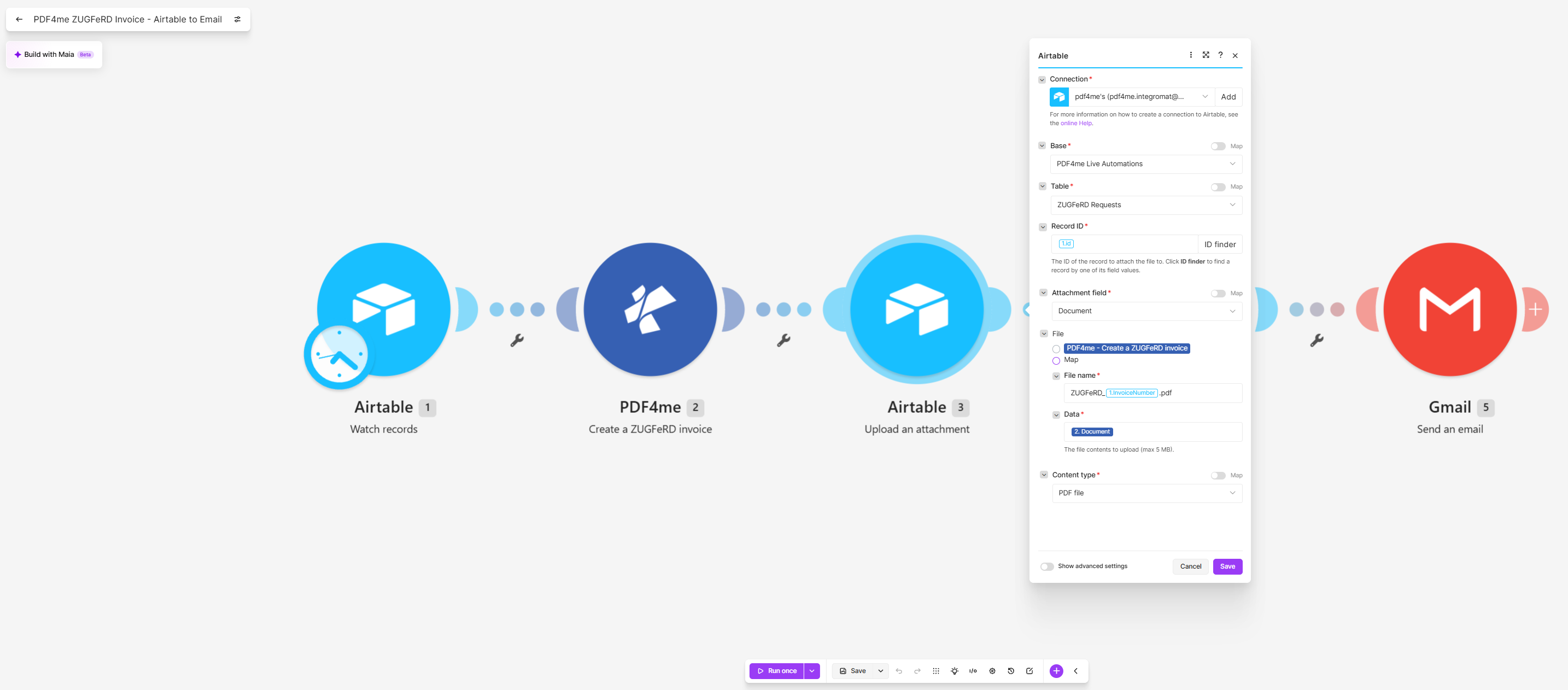
Content type is PDF file here. The Swiss QR sibling scenario uses PNG image in the same slot.
Step 4: How do you record the outcome on the row?
Flow so far: everything through the attachment upload.
- Add Airtable > Update a record.
- Configure:
- Base and Table: as in step 1
- Record ID: the
idfrom the trigger - Record: fill in only what you want written back, which is normally Status and an OutputLink
Update a record configuration
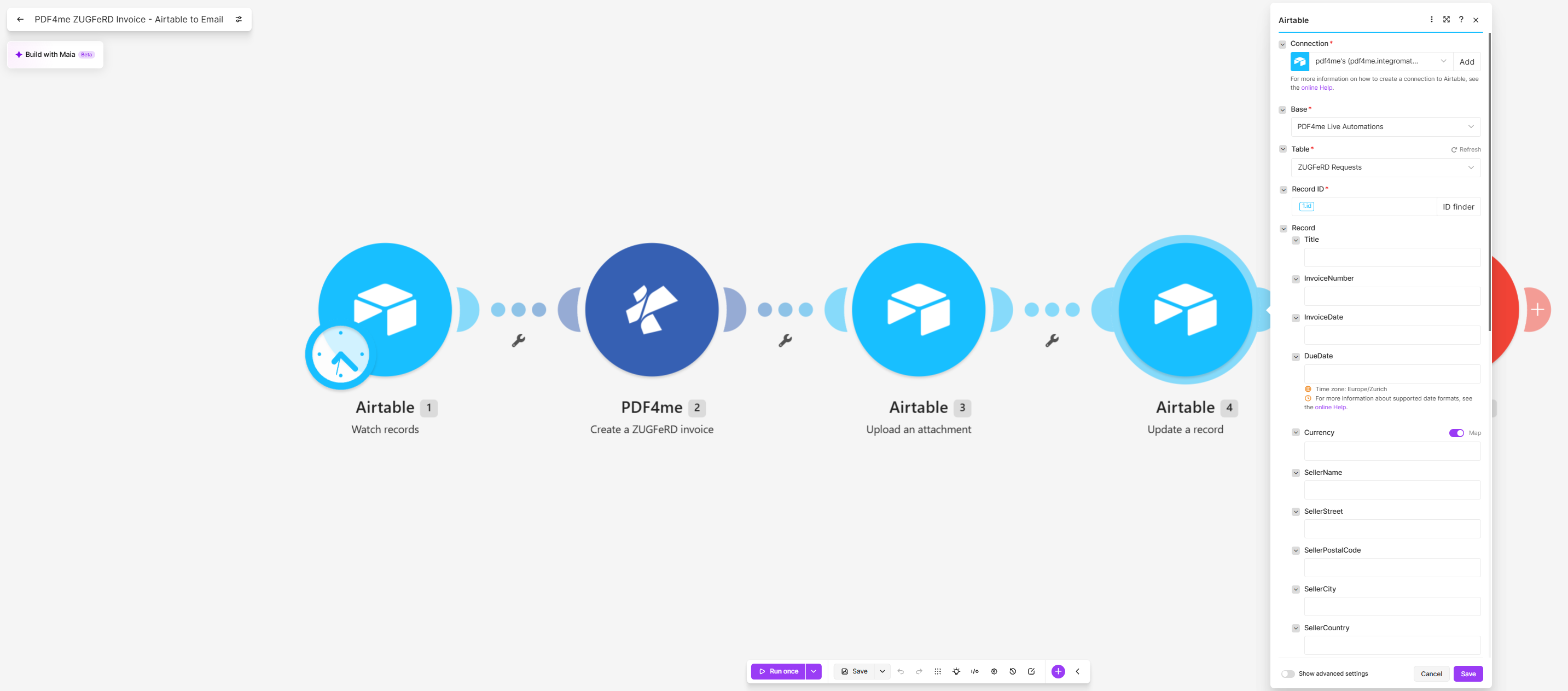
Every column in the table appears here. The capture shows them empty and the panel scrolled, so set Status deliberately.
Tip. A field that is mapped but empty clears the cell. On an invoice table that means a blank VAT ID or a lost due date on a run that otherwise reported success, so leave alone everything you are not deliberately writing.
Step 5: How do you send the e-invoice to the buyer?
Flow so far: everything through the record update.
An e-invoice sitting in a base has not been issued.
- Add Gmail > Send an email.
- Configure:
- To: the Email column from the trigger
- Subject:
Your e-invoiceplus the InvoiceNumber - Body type:
Raw HTML - Content: a short HTML body naming the buyer, the invoice and the total
- Add the attachment:
- File: the PDF4me - Create a ZUGFeRD invoice output
- File name:
ZUGFeRD_plus the InvoiceNumber plus.pdf - Data: the Document output of module 2
Send an email configuration
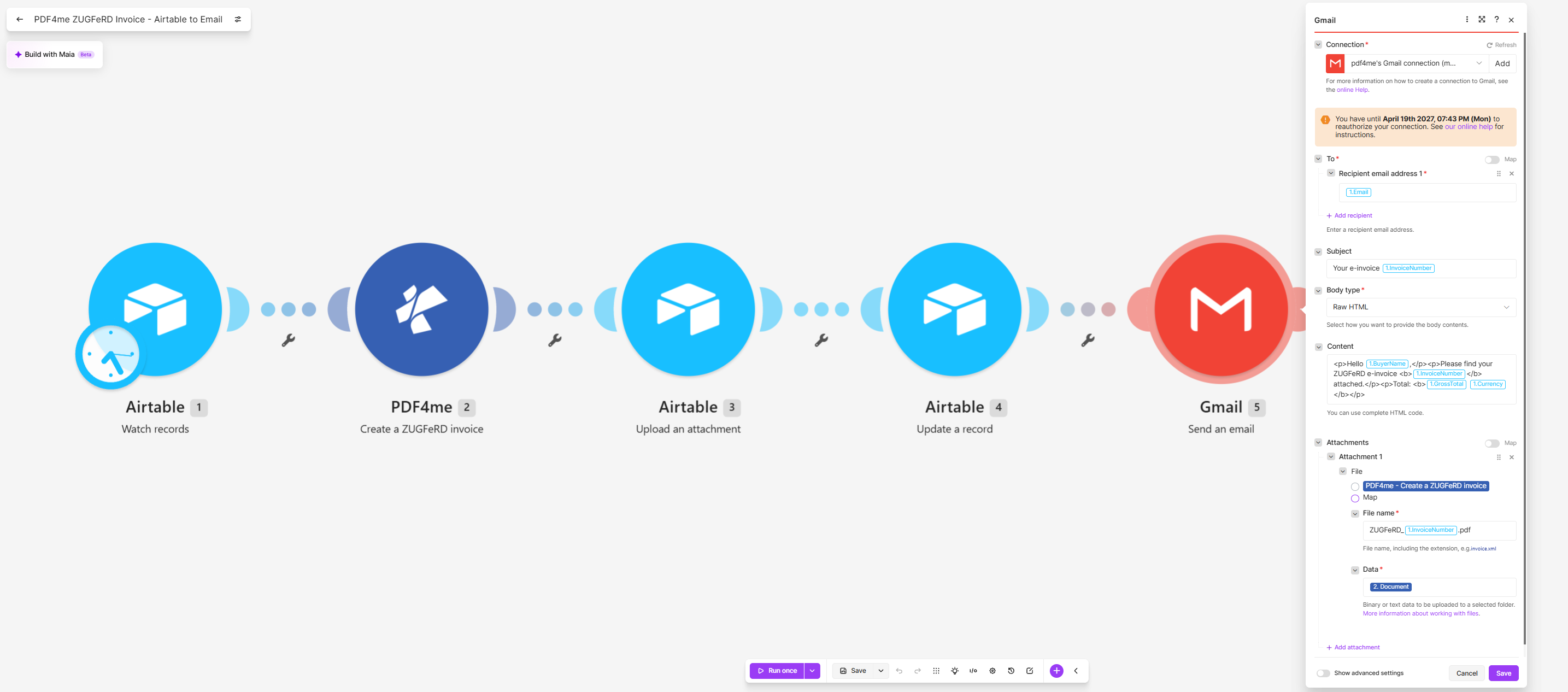
The attachment comes from module 2, so Airtable is never read back for the file.
Run the Scenario and Verify
- Save the scenario and run it once.
- Add a row to
ZUGFeRD Requestswith a seller, a buyer, one line item, both dates and StatusNew. - All five modules should report one operation each.
- Open the row: the
Documentfield should hold a PDF named after the invoice number. - Open the attachment. You should see a readable invoice page, and a ZUGFeRD validator should find EN 16931 XML inside the same file.
- Check the buyer's inbox for the message and its attachment.
In the captured run, row RE-2026-0009 produced an invoice from Muster GmbH in Berlin with VAT ID DE123456789 to Test Kunde AG in Muenchen, ten units of Consulting at 100.50, and the email reported a total of 1195.95 EUR.
Do not trust the grid for decimals. The Airtable grid shows VATAmount 191 and GrossTotal 1196, while the invoice and the email both say 190.95 and 1195.95. Nothing is being recalculated: TaxTotal and GrandTotal are read straight from those two columns. The grid is simply displaying them at the precision the number field is set to. Widen that precision before anyone tries to reconcile a column against an invoice, because the figures only look inconsistent.
Common Variations You Can Add Without Rebuilding
How this compares to the other ways of producing an e-invoice
Each row describes the alternative. The last row is this scenario.
| Comparison | Who runs it | Where the data comes from | What you maintain |
|---|---|---|---|
| E-invoicing platform vs this scenario | Finance, through a portal | Uploads or an integration | A per-document contract and a connection to it |
| ERP module vs this scenario | Finance, inside the ERP | The ERP's own ledger | Licences, and a migration to get your data in |
| Developer library vs this scenario | A developer, inside an application | Your database, through code | The code, the schema updates and the releases |
| This scenario | Anyone who can add an Airtable row | The base the team already keeps | Five modules and one JSON object |
Common questions
What is accounts payable automation?
On the receiving side it means an invoice arrives, its fields are read without anyone keying them in, the figures are checked, and the result is posted or routed for approval. A hybrid e-invoice is what makes the reading step reliable, because the data is embedded rather than recovered from a picture of a page.
This scenario is the sending half of that arrangement. Producing a file the buyer's system can parse is what lets their accounts payable run unattended.
Can Airtable create invoices?
Not compliant ones. Airtable can hold invoice data and lay it out in an interface or a printable view, but it cannot produce a PDF/A-3 carrying conformant EN 16931 XML, and that is what an e-invoicing mandate asks for.
The split this scenario uses is the practical one: Airtable is the record, PDF4me produces the artefact, and the artefact comes back to the record as an attachment.
How does accounts payable automation work?
It works in three parts: intake, extraction and posting. Intake is getting documents into one place; extraction turns them into fields; posting writes those fields into the ledger, usually with a confidence or approval gate in front of it.
Hybrid e-invoices short-circuit the middle part. When the XML is already inside the file, extraction is parsing rather than recognition, which is why mandates keep pushing in that direction.
What is Airtable automation?
Airtable ships its own automation builder for triggers and actions inside a base, and that covers plenty of internal work. It cannot call a document API and hand back a file for an attachment field, which is the step this scenario needs.
Make sits beside it for exactly that reason. The trigger still watches an Airtable table, but the middle of the scenario can reach services Airtable's own automations cannot.
Troubleshooting
Open the module's input bundle in the run history and read it as JSON. An empty Airtable column leaves a key empty, and a money value that kept its quotes arrives as text where a number is expected. Both produce an object that looks fine and still fails conversion.
Conformance Level decides which fields the profile requires. Claiming EN16931 while the JSON omits keys that profile expects fails validation even though the file opens normally. Supply the missing keys or drop to a lower profile.
Render Invoice on PDF is set to No and no base PDF was supplied, so the XML was embedded with nothing drawn. The file is still a valid e-invoice, but its human half is empty.
Check Output Mode is XML With PDF, then check that modules 3 and 5 both take their data from module 2. Attaching anything else sends a page that looks right and carries nothing their software can read.
Next Steps
A mandate usually arrives as a file format problem. It is really a question about where your invoice data already lives, and whether anything can read it.