Create a ZUGFeRD 2.0+ E-Invoice in Make: A 4-Module Dropbox Workflow
· 21 min read
SEO and Content Writer

ZUGFeRD 2.0+ (also known as Factur-X in France and XRechnung in the German public sector) is a hybrid PDF/A-3 invoice with the machine-readable XML embedded inside the PDF. One file that both humans and ERP systems can consume. This guide walks through the exact run shown in the screenshots: a base invoice PDF and a ZUGFeRD 2.0+ XML in Dropbox become an EN16931-compliant hybrid e-invoice in /pdf4meoutput/, in 4 Make modules, zero code.

The scenario at a glance
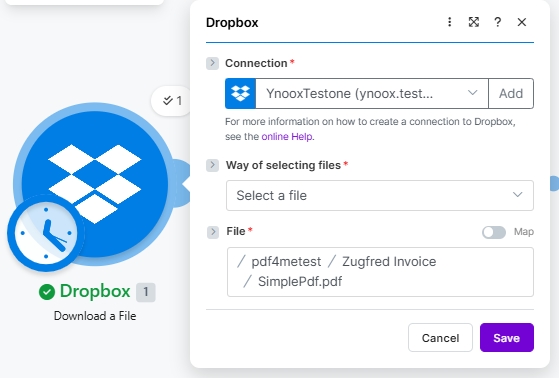
1. Dropbox Download (PDF)
Pulls the base invoice PDF (/pdf4metest/Zugfred Invoice/SimplePdf.pdf). Scheduled trigger shown.
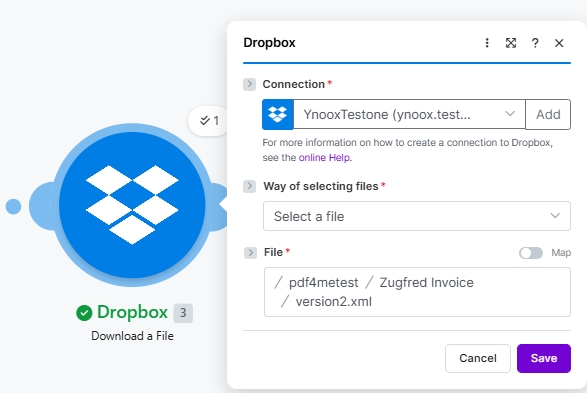
2. Dropbox Download (XML)
Pulls the ZUGFeRD 2.0+ XML invoice data (/pdf4metest/Zugfred Invoice/version2.xml).
3. PDF4me Create a ZUGFeRD invoice
Input Format XML, Output Mode XML With PDF, ZUGFeRD Version 2+, Conformance EN16931, Render Yes, Language de.
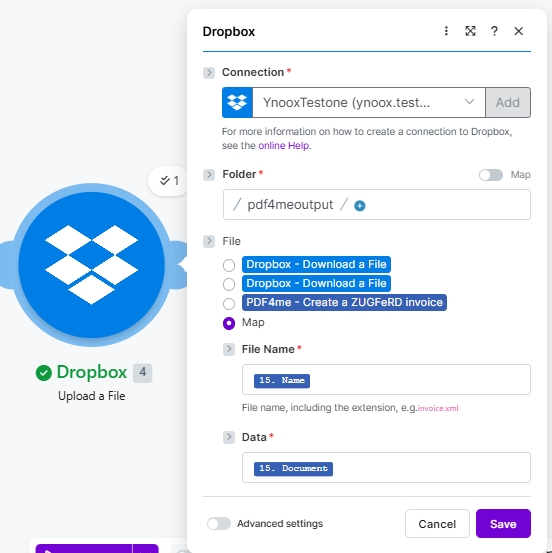
4. Dropbox Upload
Writes the hybrid PDF/A-3 e-invoice to /pdf4meoutput/ using File set to Map.
The short version

Four Make modules end-to-end. Two Dropbox Download a File steps pull the base PDF and the ZUGFeRD 2.0+ XML (the screenshots show YnooxTestone connection plus paths /pdf4metest/Zugfred Invoice/SimplePdf.pdf and /pdf4metest/Zugfred Invoice/version2.xml). PDF4me Create a ZUGFeRD invoice embeds the XML into the PDF with Output Mode XML With PDF, ZUGFeRD Version 2+, Conformance Level EN16931, Render Invoice on PDF Yes, Language de. Dropbox Upload a File writes the resulting hybrid PDF/A-3 to /pdf4meoutput/ with File set to Map, File Name 15. Name, Data 15. Document. The output opens in any PDF reader and parses cleanly in any ERP that supports ZUGFeRD / Factur-X / XRechnung.

Two things that decide whether your ERP accepts the invoice

First, the Conformance Level must match what your buyer or recipient ERP expects. EN16931 (Comfort) is the German legal default and the safe choice for B2B in the EU; XRECHNUNG is required for B2G (public-sector) invoicing in Germany; BASIC works for most other buyers. Second, the ZUGFeRD Version must be 2+ for anything EN 16931 aligned. Legacy 1.0 uses BASIC / COMFORT / EXTENDED and is incompatible with EN 16931 receivers. Pick 2+ unless a recipient explicitly asks for 1.0.

Common real-world questions this solves

People search this exact problem with phrasings like:

  • "How do I create a ZUGFeRD invoice with embedded XML in Make?" This 4-module scenario does it end-to-end: PDF template plus XML invoice in, hybrid PDF/A-3 out.
  • "Is ZUGFeRD the same as Factur-X?" Yes. Same technical format under different names. A ZUGFeRD 2.x file is accepted by systems expecting Factur-X and vice versa.
  • "Which Conformance Level should I pick?" EN16931 for B2B (matches German legal default and EU EN 16931), XRECHNUNG for German public sector (B2G), BASIC for broadest legacy compatibility.
  • "Do I need to write XML myself?" No, but for this scenario the screenshots use an existing XML invoice. The module also accepts JSON or CSV input and builds the XML for you.
  • "What if my buyer needs only the XML, no PDF?" Set Output Mode to XML Only and the module returns just the XML invoice file instead of the hybrid.

What you are building

A reusable Make scenario that produces a fully compliant ZUGFeRD 2.0+ hybrid e-invoice from a base PDF and an XML invoice file. Trigger can be manual, scheduled (as shown), Dropbox file-watch, or an HTTP webhook. The output is a single file that satisfies both the human-readable PDF requirement and the machine-readable XML requirement for EU e-invoicing mandates.
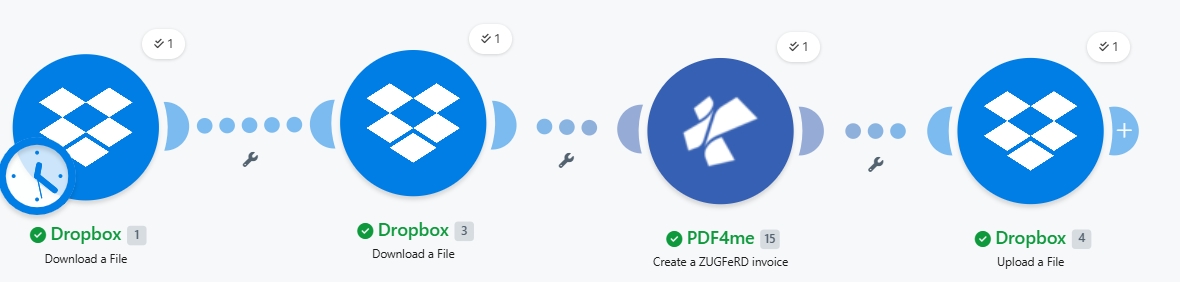
Make scenario canvas: Dropbox Download a File (PDF, with scheduled clock badge) connected to a second Dropbox Download a File (XML), connected to PDF4me Create a ZUGFeRD invoice, connected to Dropbox Upload a File. Each module shows a 1 iteration counter and a green checkmark indicating a successful run.

Four modules end-to-end. Two downloads, one PDF4me action, one upload. The clock badge on Module 1 indicates a scheduled trigger; swap to manual / file-watch / webhook to fit your use case.


What you need

  • Make account with a scenario open. Create a Make account if you need one.
  • PDF4me API key. Get your API key and connect on the first PDF4me module. See Connect PDF4me to Make.
  • Dropbox with a source folder (e.g. /pdf4metest/Zugfred Invoice/) holding the PDF template and the XML invoice, plus an output folder (/pdf4meoutput/).
  • A base PDF (the screenshots use SimplePdf.pdf). It does not need any layout markup. The module embeds the XML as a PDF/A-3 attachment.
  • A ZUGFeRD 2.0+ XML invoice. Use your own, or grab a 2.0 XML sample to follow along.

Quick reference: what each parameter does

Input Format
XML for existing ZUGFeRD XML, JSON for structured JSON, CSV for tabular invoice rows.
Output Mode
XML With PDF returns the hybrid PDF/A-3 (recommended). XML Only returns just the XML invoice file.
ZUGFeRD Version
2+ for EN 16931 alignment (use this). 1.0 is legacy with BASIC / COMFORT / EXTENDED only.
Conformance Level
2+ supports MINIMUM, BASICWL, BASIC, EN16931 (Comfort, default), EXTENDED, XRECHNUNG (German B2G).
Render Invoice on PDF
Yes draws the invoice line items visually on the PDF. Only takes effect when Output Mode is XML With PDF.
Language
Two-letter ISO code: de (default), en, fr, it, es, nl, pl, pt, cs. Controls label localisation on the rendered PDF.

Build the scenario

Module 1: Dropbox Download a File (base PDF)

Pull the source PDF where the ZUGFeRD XML will be embedded as a PDF/A-3 attachment.

FieldValue used in this run
ConnectionYnooxTestone (ynoox.test...). your Dropbox connection
Way of selecting filesSelect a file
File/pdf4metest/Zugfred Invoice/SimplePdf.pdf
Make Dropbox Download a File configuration for the base PDF. Connection YnooxTestone. Way of selecting files Select a file. File path /pdf4metest/Zugfred Invoice/SimplePdf.pdf.

Module 2: Dropbox Download a File (ZUGFeRD 2.0+ XML)

Pull the ZUGFeRD XML invoice file. The XML carries every invoice detail; the PDF is just the visual wrapper.

FieldValue used in this run
ConnectionYnooxTestone (ynoox.test...). same Dropbox connection
Way of selecting filesSelect a file
File/pdf4metest/Zugfred Invoice/version2.xml
Make Dropbox Download a File configuration for the ZUGFeRD 2.0+ XML. Connection YnooxTestone. Way of selecting files Select a file. File path /pdf4metest/Zugfred Invoice/version2.xml.

Module 3: PDF4me Create a ZUGFeRD invoice

The action that does the actual embedding. Map both downloaded files as inputs, pick your conformance settings, and run.

GroupFieldValue
AuthConnectionClassify Documen (testva...). PDF4me connection
SourceFile (PDF template)Map → Module 1 File Name + Data
SourceInput FormatXML
SourceFile (XML invoice)Map → Module 2 File Name + Data (a second File picker appears when Input Format is XML)
OutputOutput ModeXML With PDF (hybrid PDF/A-3)
OutputZUGFeRD Version2+
OutputConformance LevelEN16931
OutputRender Invoice on PDFYes
OutputLanguagede

Module 4: Dropbox Upload a File

Save the hybrid PDF/A-3 e-invoice back into the output folder.

FieldValue used in this run
ConnectionYnooxTestone (ynoox.test...)
Folder/pdf4meoutput/
FileMap (so File Name and Data come from the PDF4me step)
File Name15. Name (dynamic content from PDF4me Module 3)
Data15. Document (dynamic content from PDF4me Module 3)
Make Dropbox Upload a File configuration. Connection YnooxTestone. Folder /pdf4meoutput/. File set to Map. File Name bound to 15. Name (from PDF4me Create a ZUGFeRD invoice). Data bound to 15. Document.

Save and click Run once. The hybrid PDF/A-3 lands in /pdf4meoutput/ within a couple of seconds.


Sample files (XML, JSON, CSV)

You can substitute Module 2 (XML) for any of these inputs and change Input Format accordingly.


Troubleshooting

Conformance Level dropdown shows different options than expected
You toggled between Versions. Version 1.0 has BASIC, COMFORT, EXTENDED. Version 2+ has Empty, MINIMUM, BASICWL, BASIC, EN16931, EXTENDED, XRECHNUNG. Pick the version first; conformance levels follow.
Second File picker did not appear when Input Format is XML
It only appears when File is set to Map. Click the File radio and choose Map; the second File picker (for the XML invoice) renders below.
Buyer ERP rejects the hybrid PDF as non-compliant
Mismatched Conformance Level. Check what the receiver expects (commonly EN16931 for B2B EU, XRECHNUNG for German B2G). Re-run with the right value.
Output is XML only when you wanted the hybrid PDF
Output Mode is set to XML Only. Switch to XML With PDF.
Rendered invoice on PDF is missing line items
Render Invoice on PDF is set to No or Empty, or Output Mode is XML Only. Set both: Output Mode = XML With PDF AND Render Invoice on PDF = Yes.
Want JSON or CSV instead of XML as the input
Change Input Format. The Invoice XML Data / second File picker is replaced by an Invoice JSON Data or Invoice CSV Data text field, which you map from a Google Sheets, HTTP, or file-download module.

When to use this pattern

B2B invoicing in the EU
EN16931 (Comfort) covers the legal default for German and EU business-to-business e-invoicing.
B2G (public-sector) Germany
XRECHNUNG is required for invoicing public authorities. Same flow, different conformance level.
Cross-border Factur-X
France and other EU markets accept ZUGFeRD 2.x as Factur-X. No format conversion needed.
ERP integration without code
Buyer ERP extracts the embedded XML automatically; no manual data entry in accounts payable.


FAQ

What is ZUGFeRD 2.0+ and how does it differ from 1.0?+
ZUGFeRD 2.0+ aligns with the EU EN 16931 e-invoicing standard and supports the modern Conformance Level set (MINIMUM, BASICWL, BASIC, EN16931, EXTENDED, XRECHNUNG). ZUGFeRD 1.0 predates EN 16931 and uses BASIC / COMFORT / EXTENDED only. For any new integration in 2026 use 2+; 1.0 is kept for legacy buyer ERPs.
Is ZUGFeRD the same as Factur-X?+
Same technical format under different brand names. ZUGFeRD is the German designation; Factur-X is the French equivalent. Both align to EN 16931 and are cross-compatible: a ZUGFeRD 2.x invoice is accepted by Factur-X receivers and vice versa.
Which Conformance Level should I pick for a typical EU B2B invoice?+
EN16931 (also called Comfort). It is the German legal default and the safe choice for EU business-to-business invoicing. Use XRECHNUNG when invoicing German public authorities (B2G). Use BASIC only when a recipient ERP explicitly requires it.
Do I need to author the XML myself?+
No. The screenshots use an existing XML (Input Format = XML), but the module also accepts JSON or CSV. Choose Input Format = JSON or CSV and the XML is built for you. Sample JSON and CSV files are in the section above.
What if my buyer needs only the XML, no PDF?+
Set Output Mode to XML Only. The module returns just the XML invoice file without a PDF wrapper. Useful when the receiving ERP renders its own document and only consumes the structured data.
Can I render line items visually on the PDF page?+
Yes. Set Render Invoice on PDF = Yes (only effective when Output Mode is XML With PDF). The module draws the invoice items as a visual table on the PDF pages so human reviewers see the invoice content without opening the embedded XML.
Does this work in Power Automate, n8n, or Zapier?+
Yes. The PDF4me Create ZUGFeRD Invoice action is available on all four platforms with the same parameters. See the cross-platform comparison at the bottom of the Make action reference page.
Does the output PDF/A-3 work with every PDF viewer?+
Yes. PDF/A-3 is backward-compatible with all PDF readers. Human readers see the rendered invoice PDF; ZUGFeRD-aware ERPs extract the embedded XML automatically. Non-aware tools just see a normal PDF.

Get started