Add a Swiss QR Bill to Any Invoice PDF in Zapier: A 4-Step Dropbox Workflow

Every Swiss invoice must carry a Swiss QR Bill so banks and accounting software can scan and process the payment automatically. With Zapier and PDF4me the addition is a four-step Zap: Dropbox New File in Folder, Dropbox Find File, PDF4me Create Swiss QR Bill, Dropbox Upload File. The screenshots below walk through the exact run captured in the canvas: a 10-page invoice in /pdf4metest/Swiss-RP becomes a Swiss-compliant invoice with the payment slip appended and saved to /pdf4meoutput. Production-ready in under 10 minutes.
Four Zap steps. Dropbox New File in Folder watches /pdf4metest/Swiss-RP (Default space, Include files in subfolders False, Include file contents and sharing link both Yes). Dropbox Find File looks up 10 page.pdf in /pdf4metest/Files and returns the binary. PDF4me Create Swiss QR Bill appends a Swiss Payment Standards compliant QR-bill page (Format Type PDF, Paging Options first, Currency CHF, Reference Type QRR, Language English, Separator Line with Scissor, Amount 1923.67, IBAN CH4431999123000889012, Creditor Var Schneider AG, Ultimate Debtor Pia-Maria Rutschmann-Schnyder, Reference 210000000003139471430009017). Dropbox Upload File writes the populated PDF to /pdf4meoutput using 3. File Url, with 3. File Name and 3. File Extension as the output name. The result is a Swiss-bank-scannable PDF in the archive folder.
First, the IBAN must start with CH or LI and be 21 characters maximum. For a QRR Reference Type the IBAN must be a QR-IBAN, not a standard IBAN. Second, when Reference Type is QRR, the Reference field is a 27-digit numeric string with a mod-10 check digit; if you do not have one, switch Reference Type to SCOR (ISO 11649) or NON and leave Reference empty. Banks reject mis-typed reference values, not the QR image.
Common real-world questions this solves
People search this exact problem with phrasings like:
- "How do I add a Swiss QR bill to my PDF invoice automatically in Zapier?" This 4-step Zap does it: file lands in Dropbox, Zap runs, QR-bill-enhanced PDF lands in the output folder.
- "Can Zapier generate a Swiss QR-bill from an existing invoice?" Yes, via the PDF4me Create Swiss QR Bill action. The output is the same PDF with the payment slip appended on the page you choose (first, last, or specific).
- "Do I need a QR-code library or Swiss QR generator subscription?" No. The PDF4me action hides QR generation, mod-10 reference math, and the full Swiss Payment Standards layout behind a single Zapier step.
- "What if I do not have a source PDF, can I generate a standalone QR slip?" Yes. Skip Step 2 (Find File) and the File / File URL fields in Step 3. the action returns a standalone Swiss QR-bill PDF from payment data alone.
- "Will Swiss banks accept this output?" The action produces an ISO 20022 Swiss Payment Standards compliant slip. Every Swiss bank's mobile-banking app can scan it for payment initiation.
What you are building
A reusable 4-step Zapier Zap. The trigger watches a Dropbox folder, the Zap finds the latest invoice, runs the PDF4me Swiss QR Bill action with your creditor + debtor + payment details, and uploads the enhanced PDF to an output folder. Same pattern works for outgoing customer invoices, scheduled batch runs, or fully event-driven AR processing.
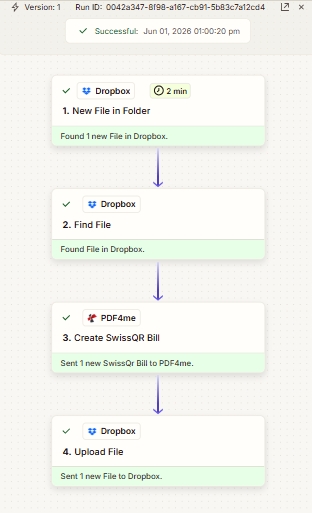
Four steps top to bottom. The 2-minute interval on Step 1 is Zapier's default polling cadence for Dropbox triggers; upgrade plans can poll more frequently.
What you need
- Zapier account. Create a Zapier account if you need one.
- PDF4me API key. Get your API key and add it when PDF4me prompts for an account in the Zap editor. See Connect PDF4me to Zapier.
- Dropbox with a source folder (e.g.
/pdf4metest/Swiss-RP) and an output folder (/pdf4meoutput). - An invoice PDF (the screenshots use
10 page.pdf). Optional: skip the source file for a standalone QR-slip from payment data alone. - Swiss payment data: a CH or LI IBAN, amount, currency (
CHForEUR), and creditor + debtor name/address blocks. Full field reference in the action docs.
Quick reference: key parameters
Build the Zap
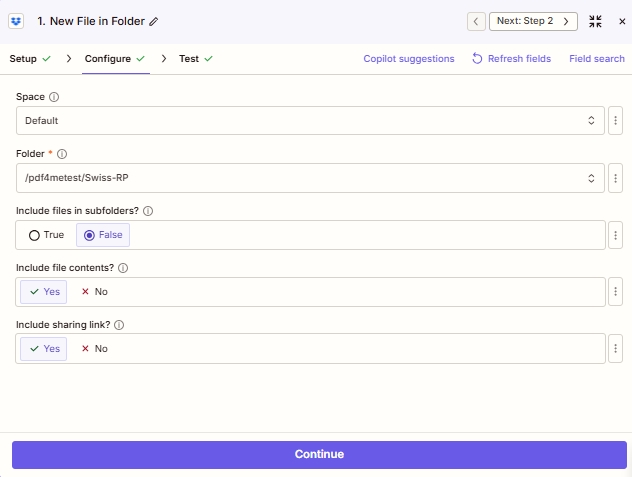
Step 1: Dropbox - New File in Folder (trigger)
Watch the source folder for new invoices.
| Field | Value used in this run |
|---|---|
| Space | Default |
| Folder | /pdf4metest/Swiss-RP |
| Include files in subfolders? | False |
| Include file contents? | Yes |
| Include sharing link? | Yes |
Step 2: Dropbox - Find File
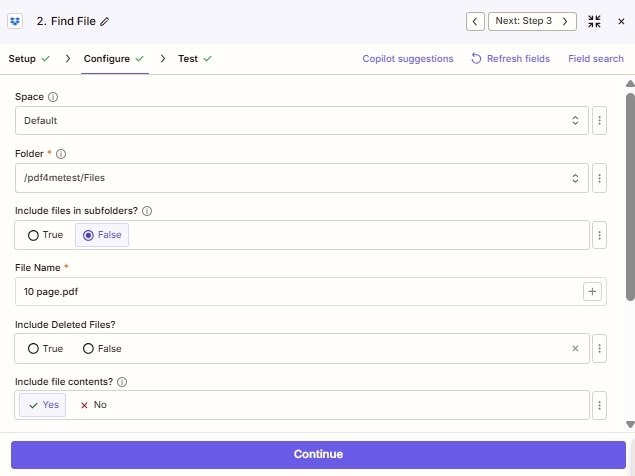
Resolve the file by name. This gives you a stable, mappable File reference for Step 3.
| Field | Value used in this run |
|---|---|
| Space | Default |
| Folder | /pdf4metest/Files |
| Include files in subfolders? | False |
| File Name | 10 page.pdf |
| Include Deleted Files? | False |
| Include file contents? | Yes |
Step 3: PDF4me - Create SwissQR Bill
The action that does the work. Search for PDF4me in the action picker, pick Create Swiss QR Bill, then fill the fields exactly as the screenshots in the action reference show. The minimum to match this run:
| Group | Field | Value |
|---|---|---|
| Source | Format Type | PDF |
| Source | File | 2. File: (Exists but not shown) |
| Source | File Name | 2. File Name: 10 page + 2. File Ext: .pdf |
| Source | paging Options | first |
| Payment | Currency | CHF |
| Payment | Reference Type | QRR |
| Payment | Language Type | English |
| Payment | Separator Line | Line with Scissor |
| Payment | Amount | 1923.67 |
| Payment | IBAN | CH4431999123000889012 |
| Creditor | Creditor Address Type | S |
| Creditor | Creditor Name | Var Schneider AG |
| Creditor | Creditor:Street / Address Line 1 | Var Schneider AG |
| Creditor | Creditor:Building No. / Address Line 2 | 23 |
| Creditor | Creditor City | biel |
| Creditor | Creditor Postal Code | 2501 |
| Debtor | Ultimate Debtor Address Type | S |
| Debtor | Ultimate Debtor Name | Pia-Maria Rutschmann-Schnyder |
| Debtor | Ultimate Debtor:Address Line 1 | Grosse Marktgasse |
| Debtor | Ultimate Debtor:Address Line 2 | 32 |
| Debtor | Ultimate Debtor City | Rorschach |
| Debtor | Ultimate Debtor Postal Code | 9400 |
| Ref/Msg | Reference | 210000000003139471430009017 |
| Ref/Msg | Unstructured Message | Instruction of 15.09.2019 |
| Ref/Msg | Billing Info | S1/01/20170309/11/10201409/20/14000000/22/36958/30/CH106017086/40/1020/41/3010 |
| Ref/Msg | AV1 Parameters | Name AV1: UV;UltraPay005;12345 |
| Ref/Msg | AV2 Parameters | Name AV2: XY;XYService;54321 |
Step 4: Dropbox - Upload File
Save the populated PDF to the output folder.
| Field | Value used in this run |
|---|---|
| Space | Default |
| Folder | /pdf4meoutput |
| File | 3. File Url (from PDF4me Step 3) |
| Overwrite | no |
| Specify File Name | 3. File Name: 10 page (from PDF4me Step 3) |
| Specify File Extension | 3. File Extension: .pdf (from PDF4me Step 3) |
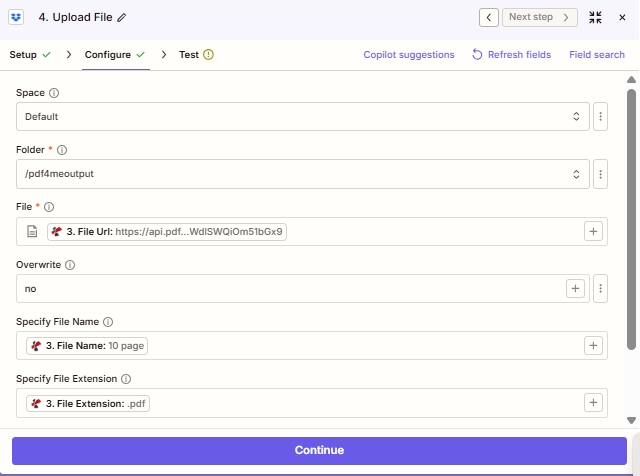
Map File to the PDF4me File Url output (Step 3); separate Specify File Name and Specify File Extension fields preserve the original name.
Save and click Publish. The Zap is live; drop a new invoice in /pdf4metest/Swiss-RP and the QR-bill-enhanced PDF lands in /pdf4meoutput within the next polling cycle.