Add a Swiss QR Bill to Any Invoice PDF in Power Automate: A 4-Action Dropbox Workflow

Every Swiss invoice must carry a Swiss QR Bill so banks and accounting software can scan and process the payment automatically. With Power Automate and PDF4me the addition is a four-action flow: Manually trigger, Dropbox Get file content, PDF4me Barcode - Create SwissQR Bill, Dropbox Create file. The screenshots below walk through the exact run captured in the canvas. A 10-page invoice in /pdf4metest/sample becomes a Swiss-compliant invoice with the payment slip appended and uploaded to /pdf4meoutput with a unique file name. Production-ready in under 10 minutes.
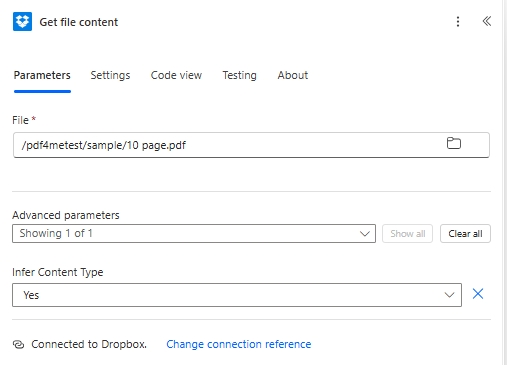
Four Power Automate actions. Manually trigger starts the flow. Dropbox Get file content reads /pdf4metest/sample/10 page.pdf with Infer Content Type set to Yes. PDF4me Barcode - Create SwissQR Bill appends a Swiss Payment Standards compliant QR-bill page (Output Format Type PNG in this run; switch to PDF for hybrid output, IBAN CH4431999123000889012, Amount 5253531, Currency CHF, Reference Type QRR, Language English, Seperator Line LineWithScissor, Creditor Var Schneider AG, Ultimate Debtor Pia-Maria Rutschmann-Schnyder, Reference 210000000003139471430009017, Paging Options custom, Page Number 3, File Name abc.pdf). Dropbox Create file writes to /pdf4meoutput with File Name built from guid() + headers/FileName for uniqueness. The output is a Swiss-bank-scannable file in the archive folder.
First, the IBAN must start with CH or LI and be 21 characters maximum. For a QRR Reference Type the IBAN must be a QR-IBAN, not a standard IBAN. Second, when Reference Type is QRR, the Reference field is a 27-digit numeric string with a mod-10 check digit. If you do not have one, switch Reference Type to SCOR (ISO 11649) or NON and leave Reference empty. Banks reject mis-typed reference values, not the QR image.
Common real-world questions this solves
People search this exact problem with phrasings like:
- "How do I add a Swiss QR bill to my PDF invoice automatically in Power Automate?" This 4-action flow does it: drop a PDF in Dropbox, trigger the flow, QR-bill-enhanced file lands in the output folder.
- "Can Power Automate generate a Swiss QR-bill from an existing invoice?" Yes, via the PDF4me Barcode - Create SwissQR Bill action. Output is the same PDF with the slip appended at first / last / a specific page.
- "Do I need a QR-code library or Swiss QR generator subscription?" No. The PDF4me action hides QR generation, mod-10 reference math, and the full Swiss Payment Standards layout behind a single Power Automate step.
- "What if I do not have a source PDF, can I generate a standalone QR slip?" Yes. Skip the File Content and File Name fields under Advanced parameters; the action returns a standalone QR-bill in the chosen Output Format Type (PDF / PNG / JPEG / Tiff).
- "Will Swiss banks accept this output?" The action produces an ISO 20022 Swiss Payment Standards compliant slip. Every Swiss bank's mobile-banking app can scan it for payment initiation.
What you are building
A reusable 4-action Power Automate flow. Trigger fires, the source invoice is pulled from Dropbox (or SharePoint / OneDrive / Outlook), the PDF4me action appends the QR-bill, and the populated file is uploaded with a guid-prefixed name. Same pattern works for outgoing customer invoices, scheduled batch runs, or event-driven AR processing.
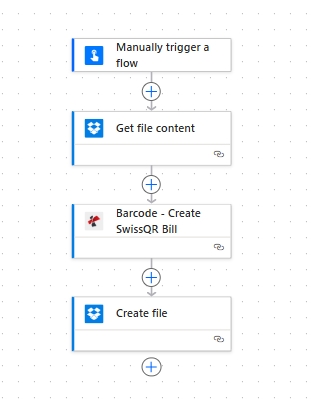
Four actions, top to bottom. Manual trigger keeps the flow easy to test; swap for any storage trigger in production.
What you need
- Power Automate account with a flow open. Open Power Automate.
- PDF4me API key. Get your API key. Sign in to the PDF4me Connect connector the first time you drop the action.
- Dropbox with a source folder (e.g.
/pdf4metest/sample) and an output folder (/pdf4meoutput). Any storage works: SharePoint, OneDrive, or Dataverse map the same way. - An invoice PDF. Download the 10-page sample used in the screenshots to follow along exactly.
- Swiss payment data: a CH or LI IBAN, amount, currency (
CHForEUR), and creditor + debtor name/address blocks. Full field reference in the action docs.
Quick reference: key parameters
Build the flow
Action 1: Manually trigger a flow
Manual trigger is the fastest way to test. In production swap for Dropbox When a file is created, SharePoint When a file is created, OneDrive When a file is created, Outlook When a new email arrives, Recurrence, or Webhooks depending on your AR pipeline.
Action 2: Dropbox - Get file content
Pull the source invoice from your input folder.
| Field | Value used in this run |
|---|---|
| File | /pdf4metest/sample/10 page.pdf |
| Infer Content Type | Yes |
Action 3: PDF4me Barcode - Create SwissQR Bill
Search for PDF4me and pick Barcode - Create SwissQR Bill. The action exposes the payment fields in the main panel and 4 fields under Advanced parameters (Paging Options, Page Number, File Content, File Name). Configure:
| Group | Field | Value |
|---|---|---|
| Output | Output Format Type | PNG |
| Payment | IBAN | CH4431999123000889012 |
| Payment | Amount | 5253531 |
| Payment | Currency | CHF |
| Payment | Reference Type | QRR |
| Payment | Language Type | English |
| Payment | Seperator Line | LineWithScissor |
| Creditor | Creditor Name | Var Schneider AG |
| Creditor | Creditor Address Type | S |
| Creditor | Creditor: Address Line 1 | Var Schneider AG |
| Creditor | Creditor: Address Line 2 | 23 |
| Creditor | Creditor PostalCode | 2501 |
| Creditor | Creditor City | biel |
| Debtor | Ultimate Debtor Name | Pia-Maria Rutschmann-Schnyder |
| Debtor | Ultimate Debtor AddressType | S |
| Debtor | Ultimate Debtor: Address Line 1 | Grosse Marktgasse |
| Debtor | Ultimate Debtor: Address Line 2 | 33 |
| Debtor | Ultimate Debtor PostalCode | 9400 |
| Debtor | Ultimate Debtor City | biel |
| Ref/Msg | Reference | 210000000003139471430009017 |
| Ref/Msg | Unstructured Message | Instruction of 15.09.2019 |
| Ref/Msg | Billing Info | S1/01/20170309/11/10201409/20/14000000/22/36958/30/CH106017086/40/1020/41/3010 |
| Ref/Msg | AV1 Parameters | Name AV1: UV;UltraPay005;12345 |
| Ref/Msg | Av2 Parameters | Name AV2: XY;XYService;54321 |
| Advanced | Paging Options | custom |
| Advanced | Page Number | 3 |
| Advanced | File Content | File Content (from Action 2) |
| Advanced | File Name | abc.pdf |
Action 4: Dropbox - Create file
Save the populated file to the output folder. Build a unique File Name with guid() so re-runs do not collide.
| Field | Value used in this run |
|---|---|
| Folder Path | /pdf4meoutput |
| File Name | guid() + headers/FileName (concat expression for a unique-per-run name) |
| File Content | File Content (from Action 3, dynamic content) |
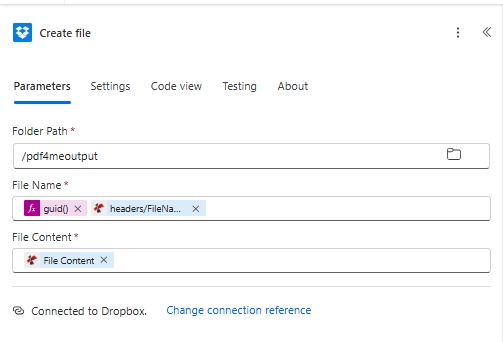
The guid() expression in File Name guarantees a unique name on every run. Dropping it next to headers/FileName from the PDF4me output preserves the original invoice name in the filename.
Save and click Test. The Swiss-bank-scannable file lands in /pdf4meoutput.