Add a Swiss QR Bill to Any Invoice PDF in Make: A 3-Module Dropbox Workflow
Every Swiss invoice must carry a Swiss QR Bill so banks and accounting software can scan and process the payment automatically. With Make and PDF4me, the addition is a three-module scenario: Dropbox Download a File, PDF4me Create Swiss QR-bill, Dropbox Upload a File. The screenshots below walk through the exact run shown in the canvas: a 10-page invoice at /pdf4metest/Files/10 page.pdf becomes a Swiss-compliant invoice with the payment slip appended and saved to /pdf4meoutput/. Production-ready in under 10 minutes.
Three Make modules. Dropbox Download a File pulls the source invoice (the screenshot shows YnooxTestone connection, Select a file, path /pdf4metest/Files/10 page.pdf). PDF4me Create Swiss QR-bill appends a Swiss Payment Standards compliant QR-bill page (Format Type PDF, Paging Options First, Currency CHF, IBAN starting with CH, full creditor + debtor blocks). Dropbox Upload a File writes the result to /pdf4meoutput/ with File set to Map, File Name = 6. Name, Data = 6. Document. The output PDF is ready for email and any Swiss bank's mobile-app QR-code scanner.
First, the IBAN must start with CH or LI and be 21 characters max. For a QRR reference type the IBAN must be a QR-IBAN, not a standard IBAN. Second, when Reference Type is QRR, the Reference field is a 27-digit numeric string with a mod-10 check digit; if you do not have one, set Reference Type to SCOR (ISO 11649) or NON and leave Reference empty. Banks reject mis-typed reference values, not the QR image.
Common real-world questions this solves
People search this exact problem with phrasings like:
- "How do I add a Swiss QR bill to my PDF invoice automatically?" Drop the invoice in Dropbox; this 3-module scenario does the rest, including IBAN, amount, reference, and creditor/debtor details.
- "Can Make generate a Swiss QR-bill from an existing invoice?" Yes. via the PDF4me Create Swiss QR-bill module. The output is the same PDF with the payment slip appended on the page you choose (first / last / specific).
- "Do I need an Excel template or QR-code library?" No. The module hides all QR-code generation, mod-10 reference math, and Swiss Payment Standards layout behind a single configurable step.
- "What if I do not have an existing invoice PDF. can I still generate a standalone QR slip?" Yes. Skip the File group entirely and the module returns a standalone Swiss QR-bill PDF.
- "Will Swiss banks actually accept this output?" The module produces an ISO 20022 Swiss Payment Standards compliant slip. Every Swiss bank's mobile-banking app can scan it for payment initiation.
What you are building
A reusable 3-module Make scenario. Trigger fires (manual, scheduled, file watch. any), the source invoice is pulled, the Swiss QR-bill is appended, the output is saved. The same pattern works for one-off testing, scheduled batch runs, or fully-event-driven invoice processing.
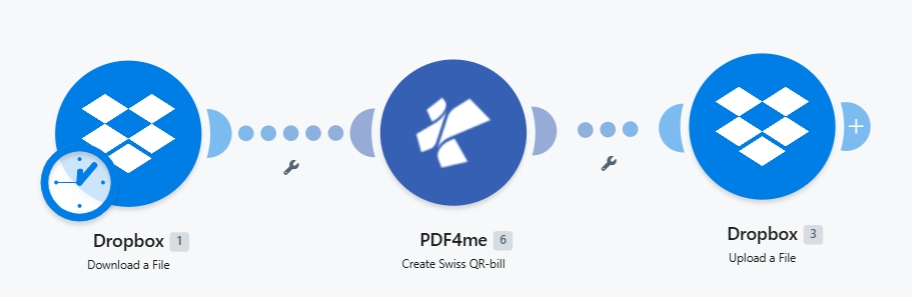
Three modules end-to-end. The clock badge on Dropbox 1 indicates a scheduled trigger. swap to manual or webhook to fit your use case.
What you need
- Make account with a scenario open. Create a Make account if you need one.
- PDF4me API key. Get your API key and add it when PDF4me prompts for a Connection. See Connect PDF4me to Make.
- Dropbox with a source folder (e.g.
/pdf4metest/Files/) and an output folder (/pdf4meoutput/). Any storage works the same way. Swap for Google Drive, OneDrive, or SharePoint as needed. - An invoice PDF (the screenshots use
10 page.pdf). Optional: skip the source file and generate a standalone QR-slip from payment data alone. - Swiss payment data: a CH or LI IBAN, amount, currency (
CHForEUR), and creditor + debtor name/address blocks. Full field reference in the action docs.
Build the scenario
Module 1: Dropbox - Download a File
Pull the source invoice from your input folder.
| Field | Value used in this run |
|---|---|
| Connection | YnooxTestone (ynoox.test...). your Dropbox connection |
| Way of selecting files | Select a file |
| File | /pdf4metest/Files/10 page.pdf |
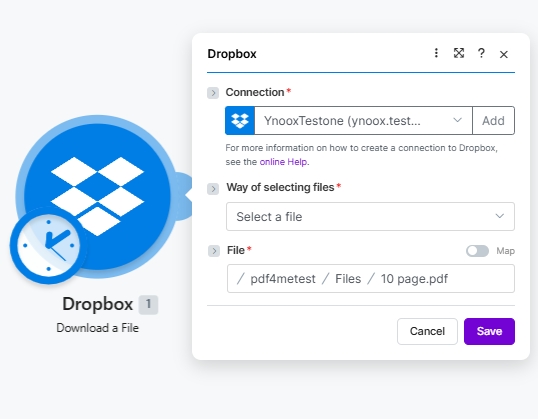
Dropbox Download a File config. Pick the file via the path picker or, for batch processing, use Search files and bind File dynamically.
Module 2: PDF4me - Create Swiss QR-bill
Search for PDF4me and pick Create Swiss QR-bill. The module exposes 26 fields. The full per-field reference (with the 5 detailed UI screenshots and example values like Var Schneider AG, CH4431999123000889012, Pia-Maria Rutschmann-Schnyder) lives on the Create SwissQR Bill in Make action page. The minimum to set:
| Group | Field | Value |
|---|---|---|
| Source | File | Dropbox - Download a File (pulls from Module 1 automatically) |
| Output | Format Type | PDF |
| Output | Paging Options | First (also: Last, or a specific 1-based page number) |
| Payment | Currency | CHF (or EUR) |
| Payment | Reference Type | QRR, SCOR, or NON |
| Payment | Language | English / German / French / Italian |
| Payment | Separator Line | Line With Scissor, Only Line, or No Line |
| Payment | Amount | e.g. 1250.00 |
| Payment | IBAN | CH or LI IBAN, max 21 chars |
| Creditor | Creditor Address Type | S (Structured) or K (Combined) |
| Creditor | Creditor Name | Company name on the account |
| Debtor | Ultimate Debtor AddressType | S or K |
Fill in the creditor and debtor address fields per your Address Type choice, then any optional Reference / Unstructured Message / Billing Info / AV1 / AV2 Parameters.
Module 3: Dropbox - Upload a File
Write the populated PDF to the output folder.
| Field | Value used in this run |
|---|---|
| Connection | YnooxTestone (ynoox.test...). same Dropbox connection as Module 1 |
| Folder | /pdf4meoutput/ |
| File | Map (so File Name and Data come from the PDF4me step) |
| File Name | 6. Name (dynamic content from PDF4me Module 2) |
| Data | 6. Document (dynamic content from PDF4me Module 2) |
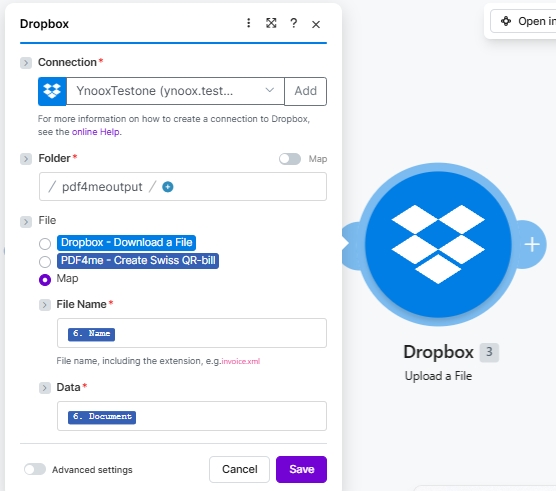
The File radio set to Map exposes File Name and Data as separate slots. Bind both to the PDF4me Module 2 outputs so the populated PDF lands intact.
Save and click Run once. The populated invoice will appear in /pdf4meoutput/ within a couple of seconds.
What lands in the output folder
A single PDF named after the source (e.g. 10 page.pdf) with the Swiss QR-bill page inserted at the position chosen in Paging Options (First puts it as the new page 1; Last appends it to the end). Open the file in any PDF viewer and the QR-bill section shows the payment QR code, the human-readable Account / Payable to block, Amount, Currency, Reference, and creditor/debtor addresses. Point a Swiss banking app at the QR code and the payment is pre-filled.